Recap 2025: Zoho Assist

2025 was a standout year for Zoho Assist. We ended the year on a high note with the launch of CoBrowse and several key improvements that delivered exceptional experiences across desktop, mobile, and enterprise deployments.
This blog highlights some of the key milestones that Zoho Assist achieved in 2025 and showcases how our team continued to build a remote support solution that prioritizes efficiency, security, and the evolving needs of technicians worldwide.
Major releases of 2025
CoBrowse in Zoho Assist
CoBrowse enables support teams to securely view and interact with a customer’s web browser in real time. Technicians can then walk a customer through forms and processes with mutual visual understanding—without requiring control of their computer remotely. Sensitive information can be masked during sessions, ensuring customer privacy while delivering faster, more intuitive support.
Zoho Assist–Zapier integration
The new Zapier integration allows teams to automate repetitive tasks and connect Zoho Assist with thousands of apps with no coding required. By eliminating manual workflows, technicians and support teams can stay focused on what matters most: resolving issues efficiently.
macOS Remote Audio support
Remote Audio is now compatible with macOS versions 13.0 and later, and this means that tech support personnel can listen to the sound being played on a remote Mac computer during a session.
Virtual monitor
Technicians supporting headless systems or single-monitor configurations will be able to extend a virtual screen to the remote computer. This feature provides a clearer view with a resolution of up to 2K.
Linux: Advanced session audit
Zoho Assist has enhanced the auditing capabilities of Linux screen-sharing sessions. Track clipboard usage, active window changes, and process activity with detailed event logs, ensuring greater transparency and compliance during remote sessions.
On-demand session recording
Technicians can start, pause, and resume the recording of any session whenever needed. When it comes to recording, downloading, and deleting, everything is automatic and can be done at any time.
And there’s more…
URS deployment for efficient OS cloning
The new URS deployment process enhances bulk deployment by allowing users to run pre- and post-imaging scripts. This makes it easier to deploy unattended devices at scale and clone entire operating systems with greater efficiency.
Diagnostic tools in the native viewer
Technicians using the native Windows viewer can now access essential diagnostic tools such as Task Manager, Command Prompt, Device Manager, Registry Editor, and more—directly within a session.
Department group export
Technicians can now export department-specific user lists using filters, enabling targeted data exports. Files can be downloaded in CSV or PDF formats, making it easier to store, review, or share departmental technician information.
Move devices across departments—no group required
Unattended access devices can now be moved between departments without being assigned to a group. Simply ungroup a device or create a new group as needed, giving you greater flexibility in device management.
Mobile application enhancements
Zoho Assist continued to improve its mobile experience in 2025 with updates focused on usability, security, and flexibility. The Android Technician App now delivers smoother and more consistent gesture responsiveness across touch, trackpad, and mousepad. ProGuard integration enhances security, reduces app size, and protects against reverse engineering.
On iOS, organizations can deploy the Zoho Assist Customer app in bulk using MDM, ensuring secure enrollment. Picture-in-picture support allows technicians to multitask without losing sight of active sessions. Additionally, both Android and iOS apps now support on-demand session recording with a refined interface for better control.
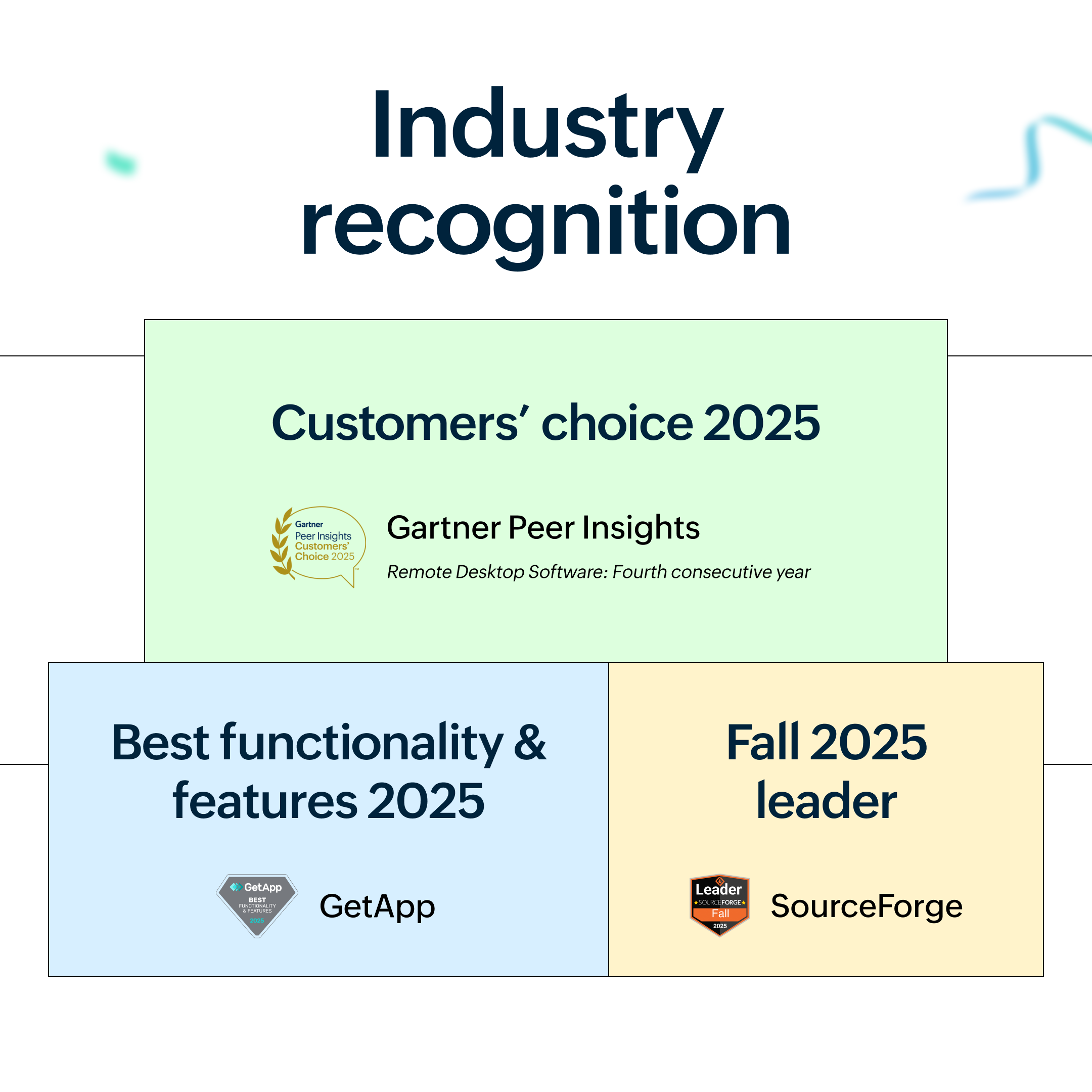
Industry recognition
Driven by customer trust and feedback, these achievements reinforce our commitment to delivering exceptional remote support.
Wrapping up 2025
2025 has been the year of innovation, optimization, and improved customer experiences at Zoho Assist. Whether it's CoBrowse and the upgrades to the mobile app or the enhanced auditing and automation, every single feature has been designed with the aim of empowering techs and optimizing remote support. We're looking forward to continuing our momentum in the coming year.
Looking forward
As we move into 2026, Zoho Assist continues to cater to techies with more intelligent, rapid, and secure remote assistance software. We're beyond thankful for all the amazing support you've given us, and we can't wait to show you what we're bringing to the table next year!


Comments