Streamline data management with Zoho Tables and Zapier

Managing data efficiently and building thoughtful workflows are crucial for any modern business. But switching between multiple apps, manually copying information, and repeating routine tasks can quickly drain time and focus. Teams today need systems that not only store data, but also work seamlessly with the tools they already use.
That’s where Zoho Tables, now available on Zapier, helps businesses connect their data and work across 8,000+ apps.
What is Zoho Tables?
Zoho Tables is a modern spreadsheet-database hybrid designed to help businesses manage their work and data. It is a powerful, customisable table-based system where you can manage everything from orders and leads to projects, tasks, and HR data.
With Zoho Tables, you can:
- Create structured bases to manage different types of business data
- Streamline your workflows
- Collaborate with teammates in real time
- Maintain a single source of truth for critical information
- Automate mundane tasks such as notifications and data updates
- View your data the way it works for you
Why integrate Zoho Tables with Zapier?
While Zoho Tables helps you organise and manage data, most businesses still rely on multiple apps for communication, marketing, sales, ecommerce, and support. Without automation, keeping these tools in sync often means manual updates and missed information.
By integrating Zoho Tables with Zapier, you can:
- Automatically send data into Zoho Tables from other apps
- Keep records updated when changes happen elsewhere
- Trigger actions in other tools based on updates in Zoho Tables
- Reduce human error and repetitive work
Zoho Tables becomes your central data hub, while Zapier ensures that every connected app stays up to date in real time.
How the integration works
With Zapier, you can create automated workflows (called Zaps) that connect Zoho Tables with other apps in your stack.
A typical workflow looks like this:
- An event happens in another app (for example, a new form submission or order)
- Zapier automatically creates or updates a record in Zoho Tables
- Additional actions like notifications or data syncs run automatically in the background
Once set up, these workflows require no manual intervention.
Real-world productivity shifts with Zoho Tables + Zapier
Order management
Every new order in Shopify can automatically create a record in your order management base in Zoho Tables. Delivery dates, payment details, and customer information stay synced, giving your operations team a single, reliable source of truth.
Task tracking and team collaboration
When a record in a monthly tasks base in Zoho Tables is marked as Completed, Zapier can instantly send a message in Slack to notify the team. Everyone stays aligned without chasing updates or status checks.
Centralized customer data
Each time a lead fills out a form, Zapier can add their details directly to a lead management base in Zoho Tables. Marketing teams can view prospects in one place, link them to campaigns, and sync the same data with email marketing tools.
Escalation alerts for support teams
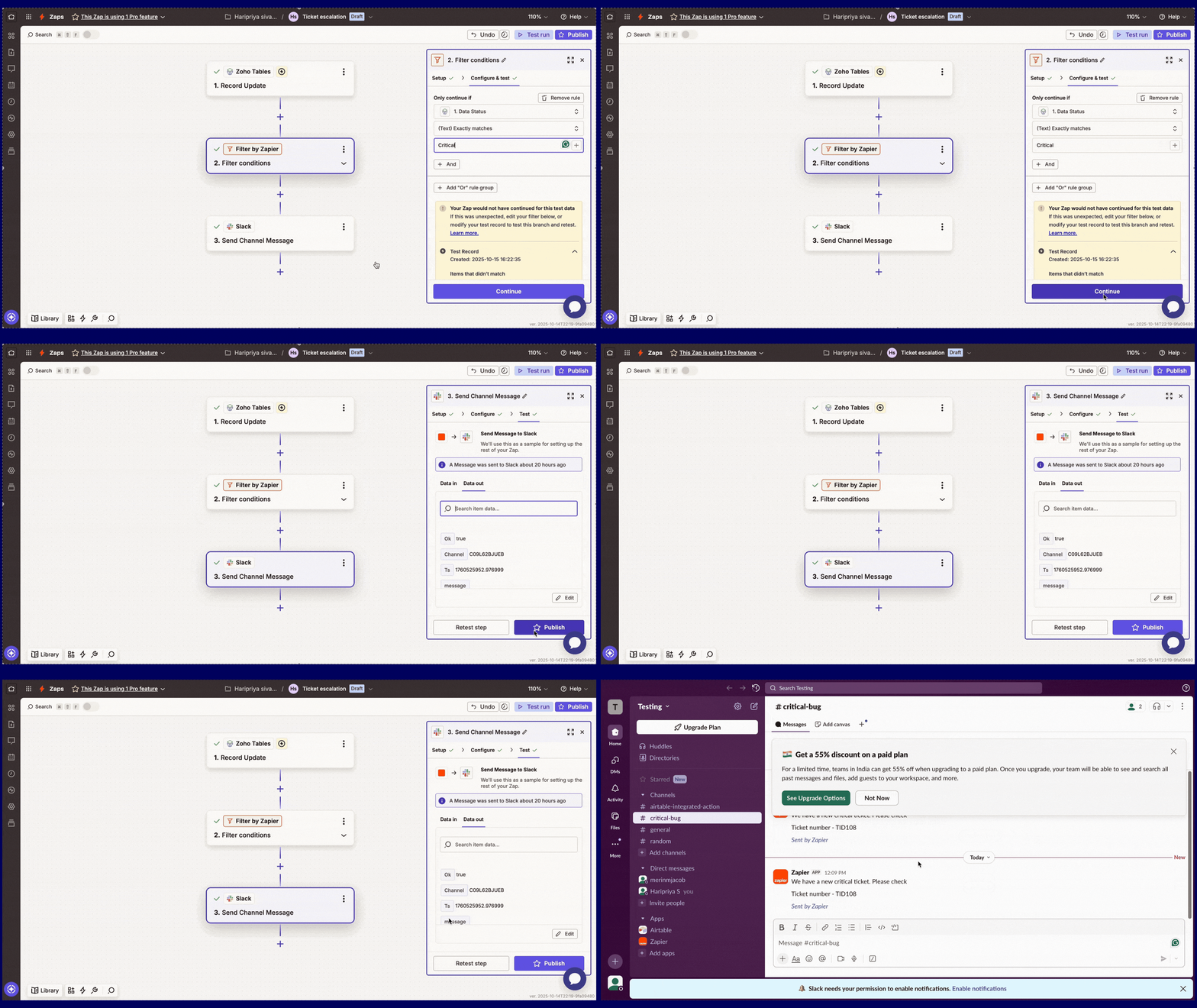
When a high-priority issue is logged in a bug tracker base in Zoho Tables, Zapier can instantly alert a dedicated Slack channel. This ensures faster response times and prevents critical issues from slipping through the cracks.
Streamlined HR workflows
When a candidate’s status changes to Shortlisted in an applicant tracker base in Zoho Tables, Zapier can automatically create a profile in your HR system. This reduces manual effort and keeps recruitment processes moving smoothly.
Workflows that stay in sync
With Zoho Tables managing your data and Zapier connecting your apps, your workflows stay effortlessly aligned. Instead of spending time switching between tools and updating records, your teams can focus on strategy, collaboration, and growth.



Comments