Introducing the new Zoho Analytics: Agentic analytics for every business

We’re excited to announce the launch of the new Zoho Analytics! This release marks a major shift for the product, from being a self-service BI platform built for creating reports and dashboards, to becoming an agentic analytics platform, where AI agents do much of the work for you.
Six agents behind one conversation
Ask Zia is now a super agent with six sub-agents that cover the full analytics workflow. These agents work from the same semantic layer, ontology and conversation context, so you can start with an analysis, move on to building a pipeline, and never lose the thread.
Data Analysis Agent
Ask a question in plain English and get more than a number back. The Data Analysis Agent gives you descriptive insights (what happened), diagnostic insights (why it happened) and prescriptive insights (what to do next). It reads your semantic layer, so “revenue” or “active customer” means what your team says it means.
Visualization Agent
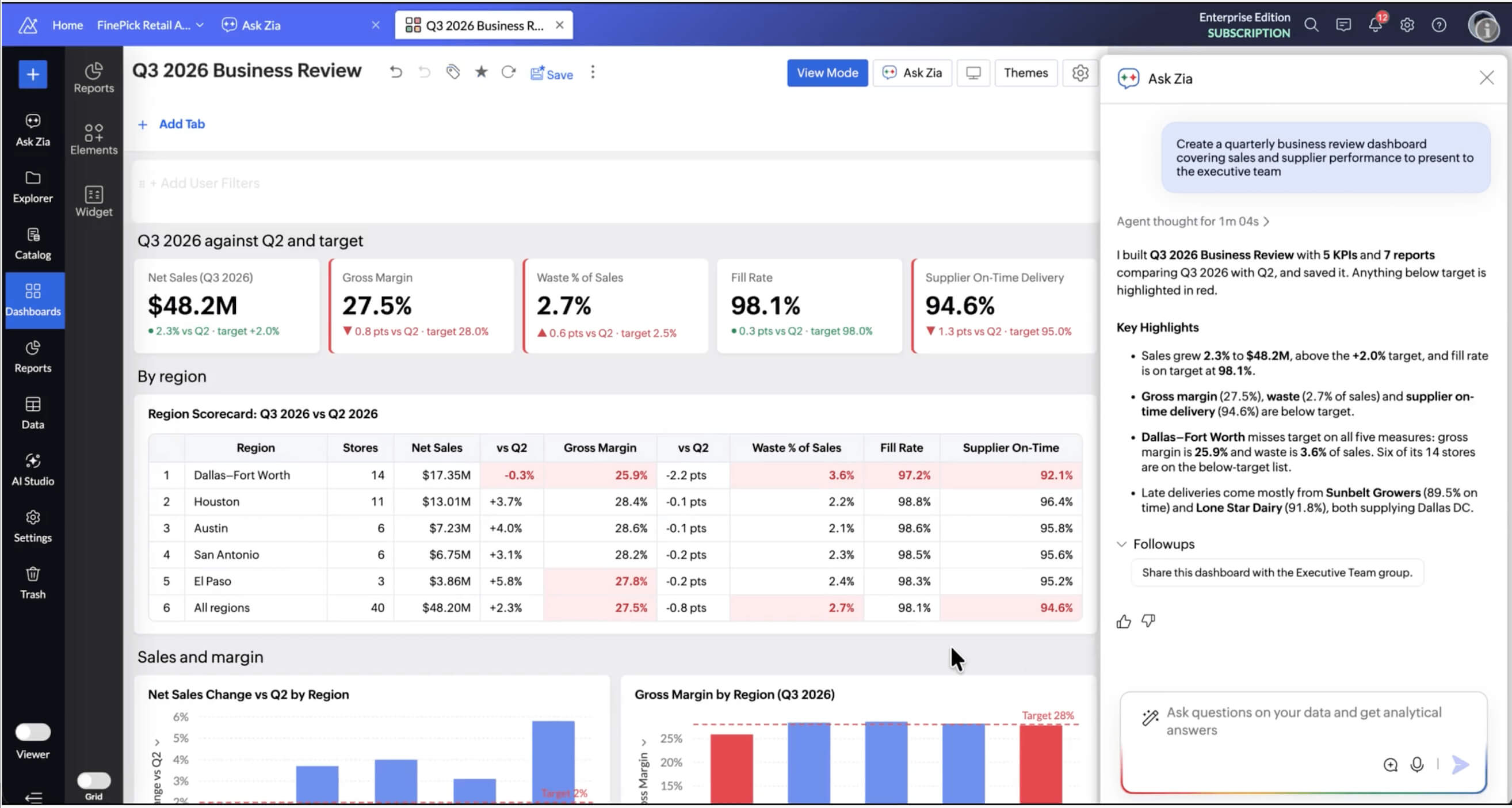
Describe the report or dashboard you want, like “monthly sales by region compared with last year,” and the Visualization Agent builds it. You can then refine it the same way, by asking for a different chart type, a filter or another breakdown. This is most useful for the KPIs you want to track on a regular schedule.
Data Preparation Agent
Messy data is where most analysis stalls. The Data Preparation Agent cleans, combines and transforms data for you, from fixing inconsistent formats to joining data from different apps. You can also describe an entire pipeline in plain words, and Zia builds it. The pipeline stays visible and editable, so you can review each step, adjust it and schedule it to run.
Formula Agent
Business metrics only help if everyone calculates them the same way. With the Formula Agent, you describe a metric, like gross margin or customer churn rate, and it writes the formula. Once defined, that metric can be reused across reports, dashboards and every other agent.
DSML Coding Agent
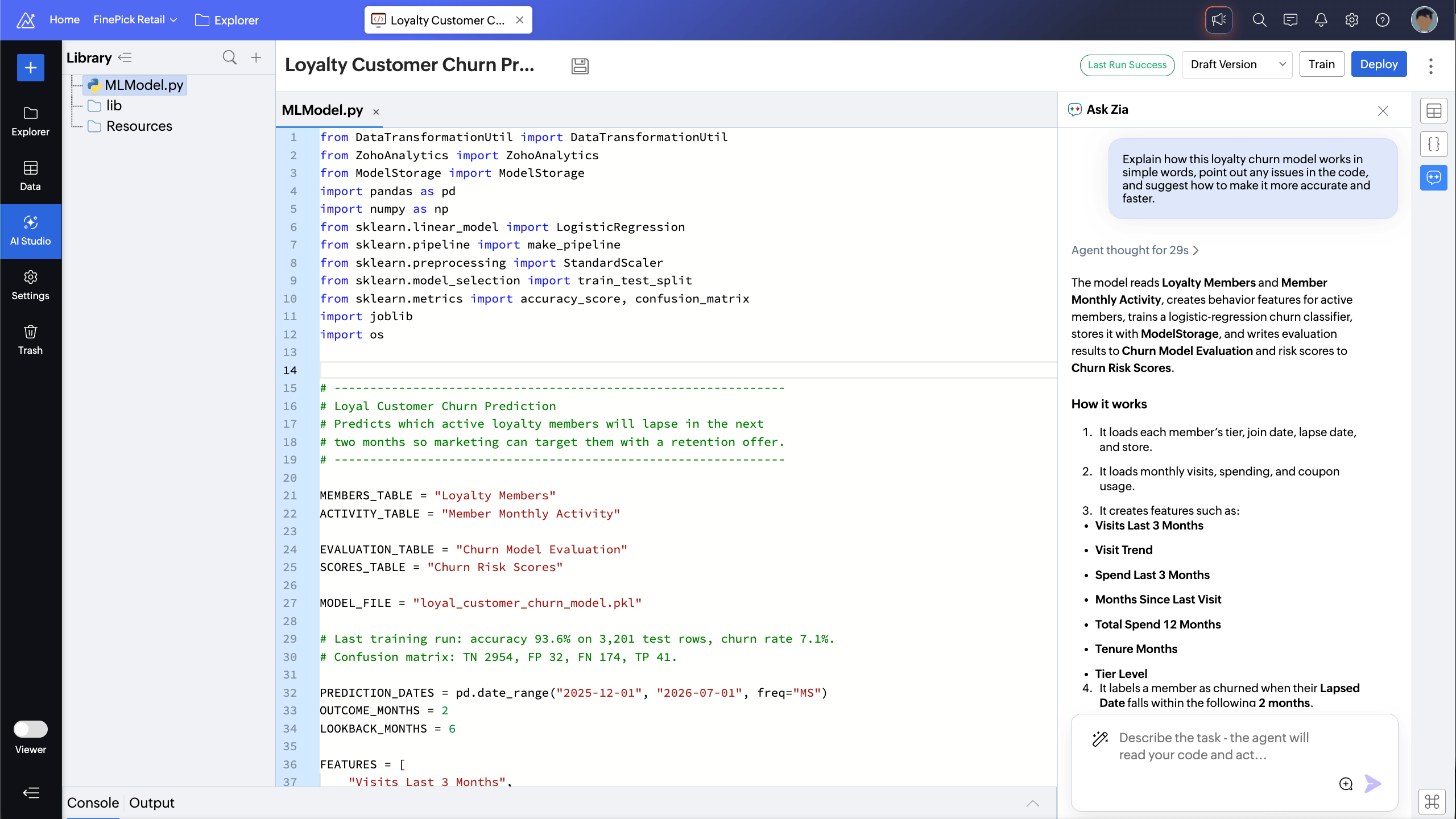
In Code Studio, the DSML Coding Agent works as your data scientist. It can train and run classification, regression, forecasting and custom machine learning models in Python. It also explains existing code, suggests optimizations and fixes errors.
SQL Agent
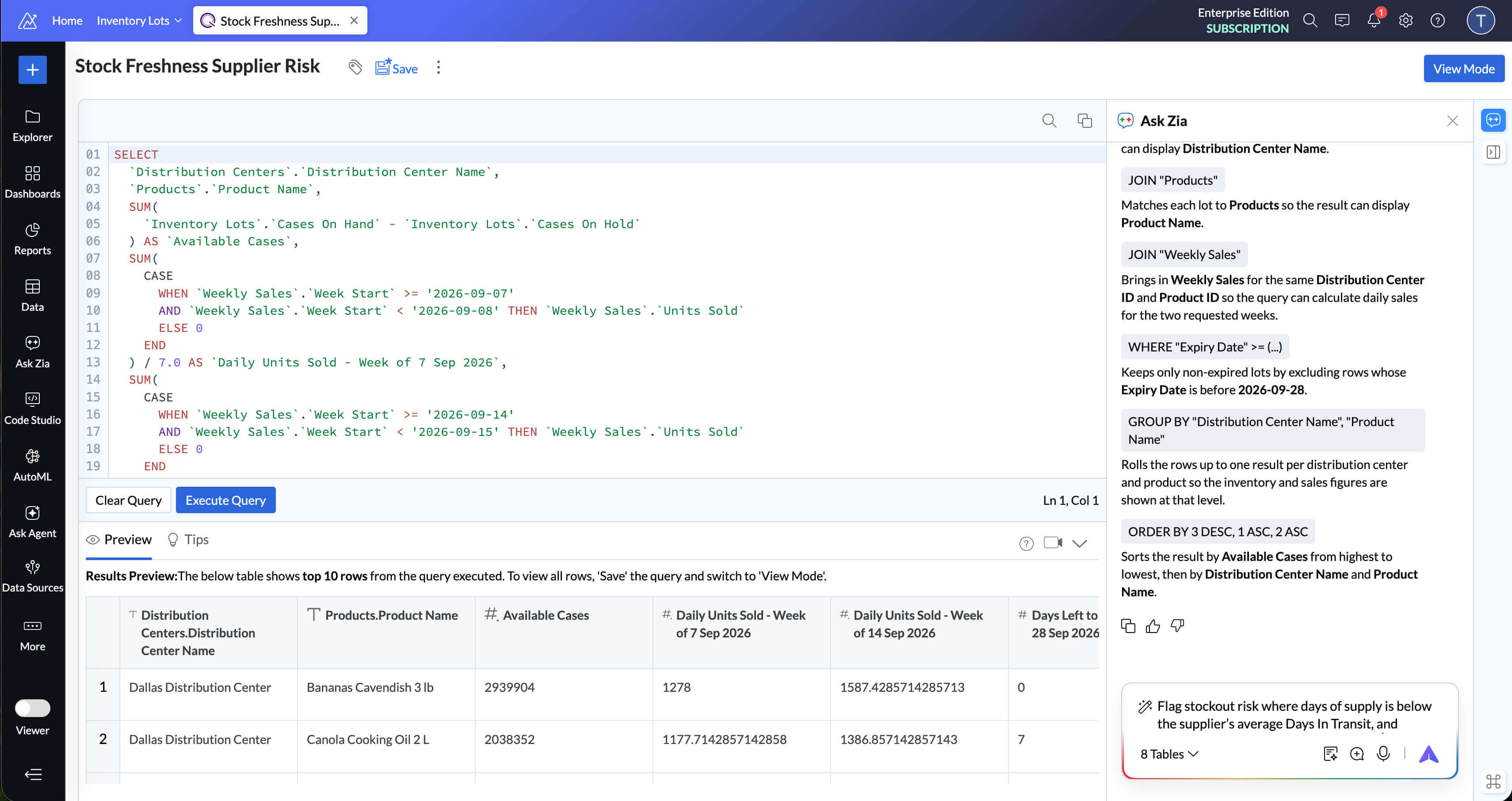
Describe the query you need, and the SQL Agent writes it. Paste in an existing query, and it explains what the query does, fixes errors or optimizes it to run faster. It’s useful for experienced analysts who want to move faster and for business users who don’t know SQL.
Zia keeps conversation history and agent memory, so follow-up questions pick up where you left off. You can run Ask Zia on Zoho LLM, use supported models from providers such as OpenAI, or bring your own key (BYOK).
Build your own agents, or start with ready-made ones
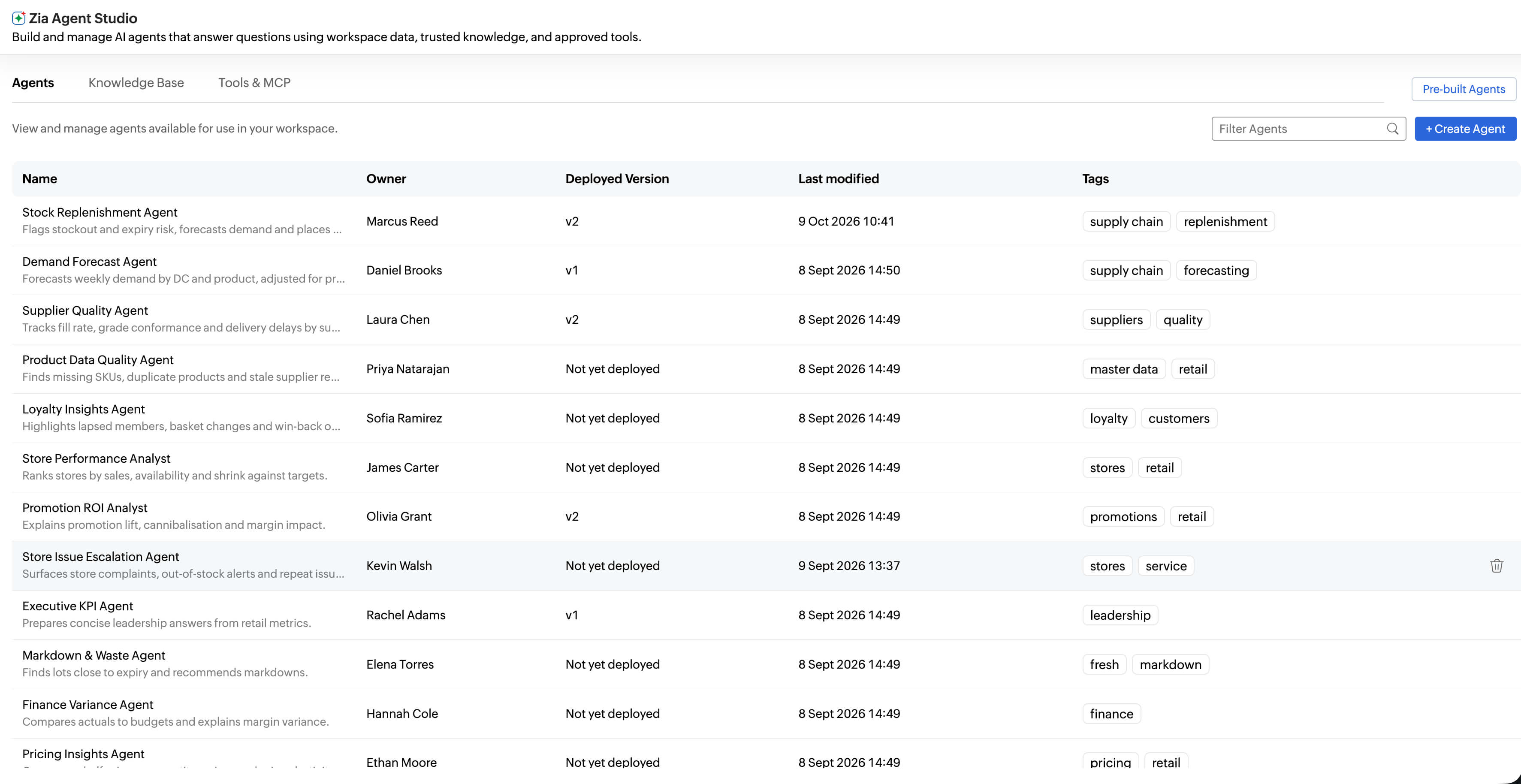
Pre-built agents from the gallery cover a range of business domains, both common and specialized, so you can put AI to work without building anything. When your workflows need something specific, create a custom agent:
Ground it in your context. Each custom agent works from your data, a semantic model you choose and a knowledge base you provide. A collections agent for finance, for example, can follow your payment terms and use your definition of an overdue invoice.
Give it the right tools. Connect a custom agent to MCP servers, web search and other tools, inside or outside Zoho Analytics, so it can do more than answer questions.
Set its boundaries. Add instructions and guardrails that keep the agent within approved limits. You decide who can use each agent and where it’s available, and every agent comes with the same governance and observability as the rest of the platform.
Give AI the context it needs
An agent that doesn’t know what “active customer” means at your company will only guess. Zoho Analytics now gives you three ways to provide that context. The ontology and semantic layer are native to Zoho Analytics, so you don’t need a separate data platform or cloud data warehouse to use them.
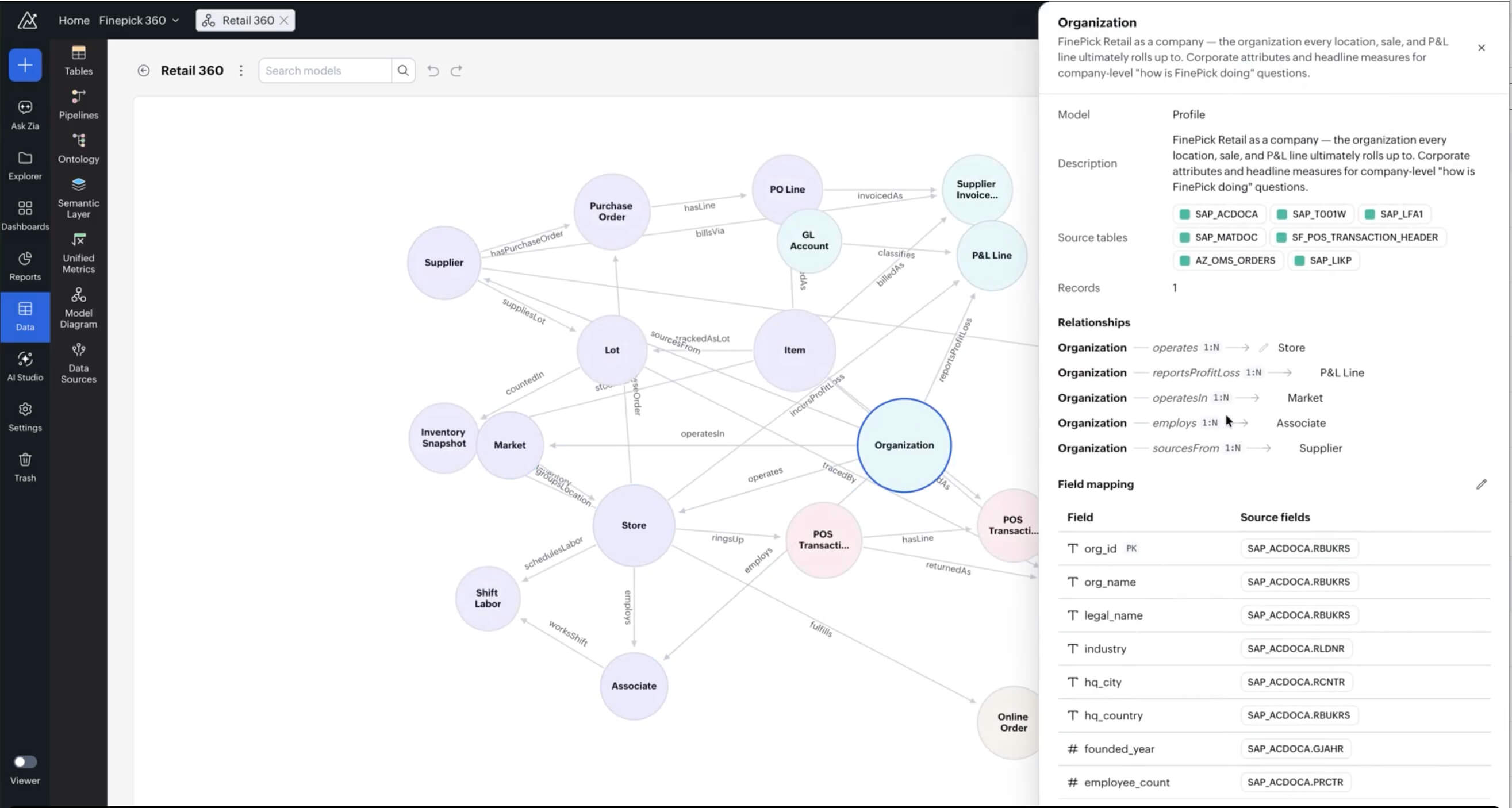
Ontology
The ontology maps your core business entities, such as customers, orders, products and vendors, and describes how they relate to one another. It gives agents a picture of how your business is structured. For Zoho customers, that includes how a CRM contact connects to a Books customer and a Desk requester, so that an agent can follow a customer’s story across apps.
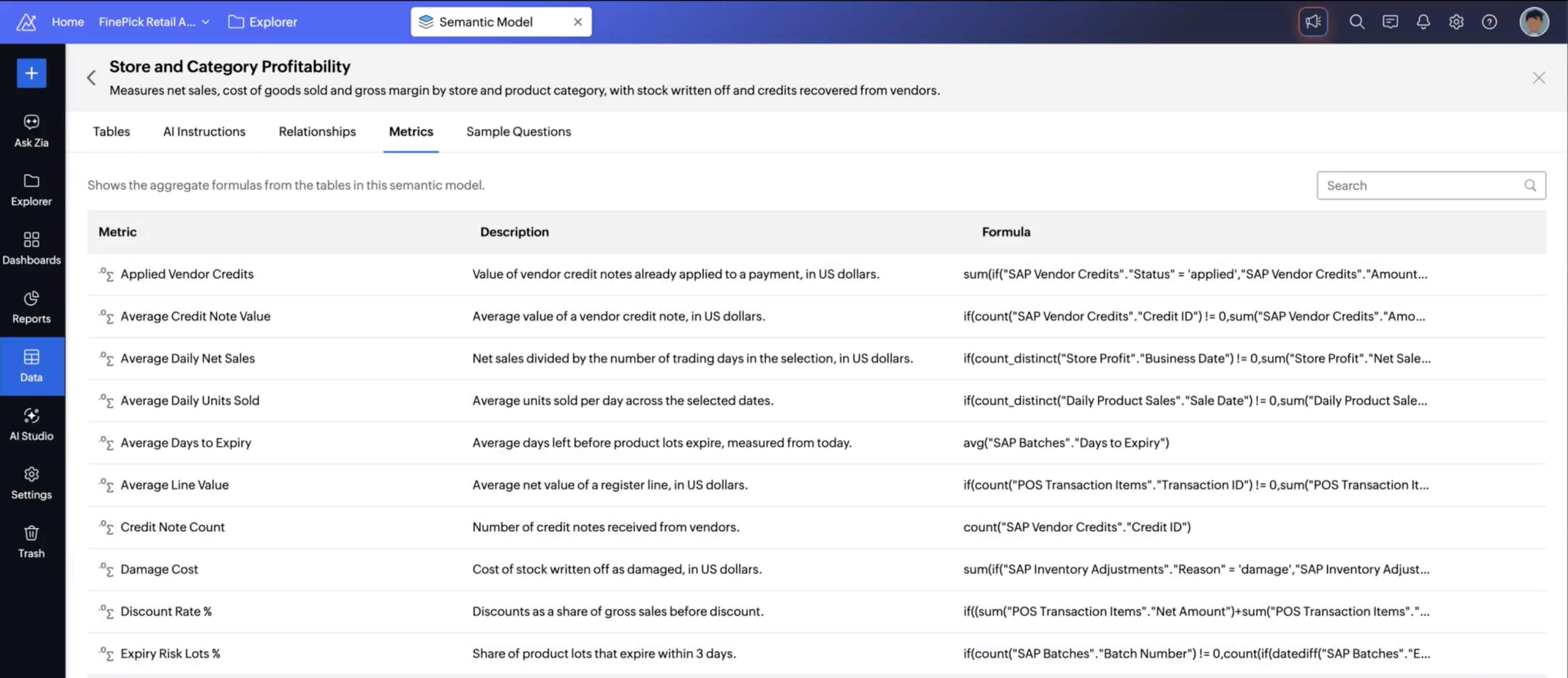
Semantic layer
The semantic layer works as a business glossary for AI. For each metric or field, you add a description, synonyms and instructions, so “sales,” “revenue” and “bookings” point to the right thing. Define a metric once, and every agent and report starts using the same definition. You can build and edit semantic models without code, and keep separate models for different teams.
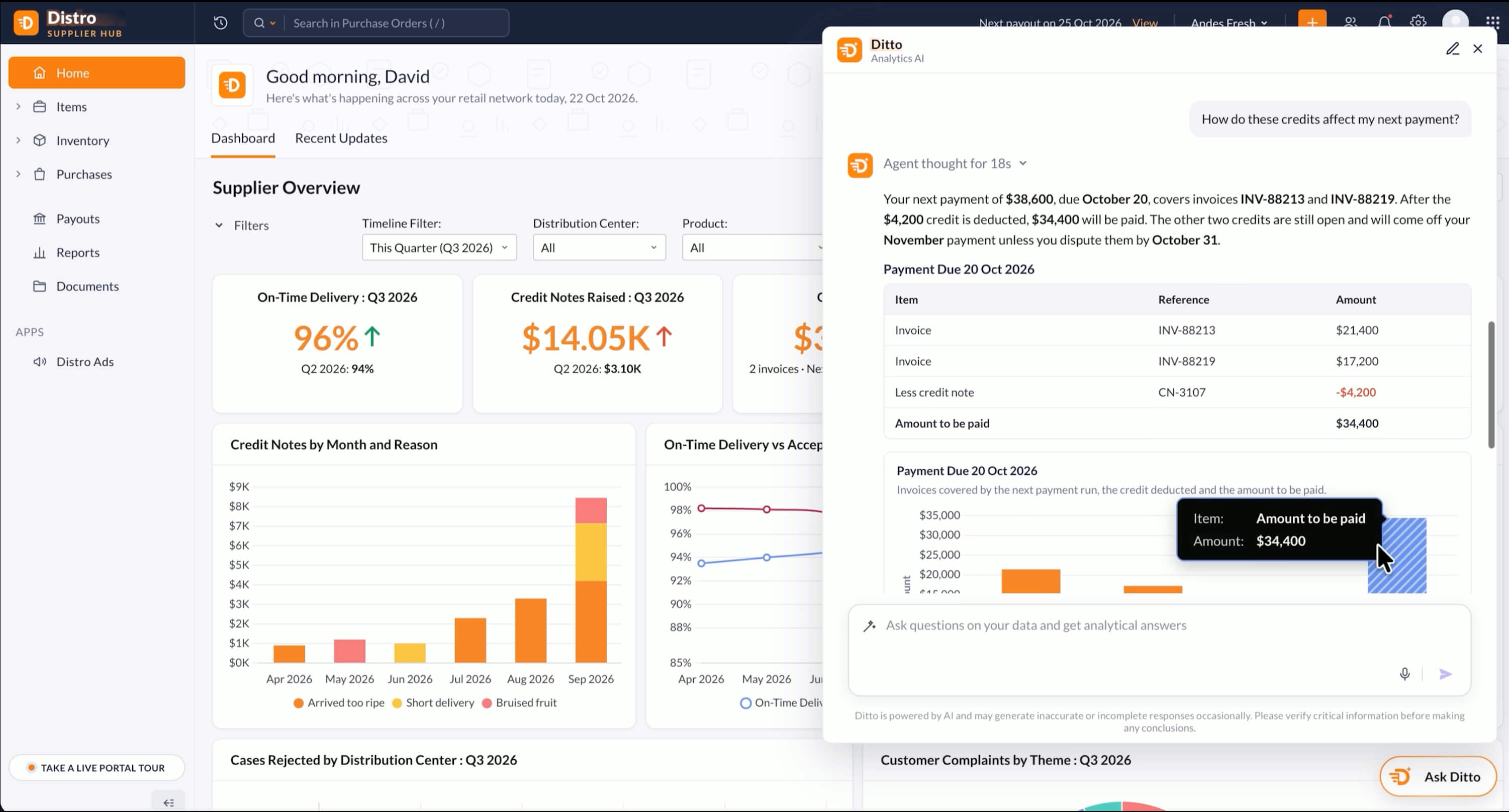
Scoping
Scoping grounds AI in specific data and dashboards. An agent answering questions for a regional sales team, for example, works only from that team’s data rather than the entire workspace. That keeps answers focused and makes it easier to trust where they came from.
Connect more of your business
Zoho Analytics adds more than 30 new connectors to the 500+ it already supports. On the Zoho side, you can now connect Zoho ERP, Zoho Spend, Zoho FSM, Zoho Shifts and Zoho Voice, so more of the apps you run your business on feed the same analysis. Beyond Zoho, new connectors include:
- SAP S/4HANA Cloud and SAP on-premise: Analyze your ERP data, from finance to supply chain, whether you run SAP in the cloud or on your own servers.
- PayPal, Adobe Commerce, Square POS and Lightspeed: Bring payment, online store and point-of-sale data together with your inventory and customer data.
- Twilio and Intercom: Analyze messaging and customer conversation data alongside your sales and support data.
- Notion: Report on the projects and workspaces your teams manage in Notion.
- Supabase, Amazon DocumentDB and Google AlloyDB: Connect more of the databases your applications run on.
The Microsoft Dynamics 365 connector now covers more modules. Zoho Projects customers on the Ultimate plan now get real-time sync with the Zoho Analytics Enterprise plan.
Try Zoho Analytics free for 15 days. No credit card required.
Go further with advanced analytics
Move from what happened to what could happen next.
Scenario analysis
Test “what if” questions before you commit. Change values on the fly, across multiple adjustment criteria at once, and see how results shift. For example, you can see what happens to profit if prices rise 5% while ad spend drops 10%.
Correlation matrix
Find out which variables move together. Single-set mode compares one variable against many, and multi-set mode compares several variables against each other. It’s a quick way to see which factors are worth a closer look before you build a model.
Time series forecasting
Forecasts are only as good as the data behind them. Gaps in your time series are now filled automatically, so missing dates don’t throw off results. You can also include related metrics and external drivers, such as promotions or weather, through VAR and VARX models.
AutoML anomaly detection
AutoML now detects anomalies, alongside prediction and clustering. It flags unusual patterns as new data arrives, so you hear about a sudden spike in refunds or a drop in orders before it shows up in a monthly report.
Jupyter notebooks
Data scientists can write code, test models and document findings in one notebook. Notebooks run directly on your Zoho Analytics data, so there’s no need to export or move it first.
PMML import
Already have models built in other tools? Import them using PMML, an industry-standard format, and deploy them on your data with no retraining or code rewrites.
Reports and dashboards, refined
Pixel-perfect reports
Design precisely formatted reports for boardrooms, clients and regulators, with full control over every design element. Scheduled bursting splits one report into personalized versions and delivers each one automatically, in the format each stakeholder needs. Every regional manager, for example, gets a report for their own region.
Custom visuals
When the built-in charts aren’t enough, build your own visuals in JavaScript, or generate them with AI assistants through MCP and APIs. You can share and install them through the Marketplace.
New charts and widgets
Cluster maps and spatial binning make dense location data readable by grouping nearby points. Pivot views now support Gantt bars and VARX forecasting, and KPI widgets can show trends as line, area or bar sparklines, so you see the trend right next to the number.
Dashboard gallery
Style dashboards with 50+ preset themes that combine backgrounds, card styles and color palettes. You can also place user filters on the left, right or top of a dashboard and adjust their size, so they sit where your viewers expect them.
Take Zoho Analytics beyond its own interface
Your analytics shouldn’t be limited to one screen. Zoho Analytics now works with the AI assistants, agents, apps and scripts your team already uses.
MCP server
The Zoho Analytics MCP server lets AI assistants and agents work directly with your analytics. It exposes tools to manage data, build data models, create visualizations and access your semantic models, so external agents work from the same definitions your team uses. It’s available as a hosted remote server or as a setup on your own infrastructure.
Claude connector and plug-in
Work with your Zoho Analytics data from inside Claude. A connector for Claude Desktop and a plug-in for Claude’s command-line tool let you ask questions in natural language and carry out supported analytics tasks, with your access permissions still in place.
CLI
A new command-line interface lets developers script against Zoho Analytics, automate routine tasks and fit analytics into their existing development workflows.
Embedded AI
Embed agents in your own apps, portals and products under your own brand. Permissions and governance stay intact wherever the agents run, so each user sees only the data they’re allowed to see. White-labeled portals also get custom icons, reusable CSS templates, a dedicated listing of portal contacts, and Ask Zia for your portal users. Talk to our team about embedded analytics solutions.
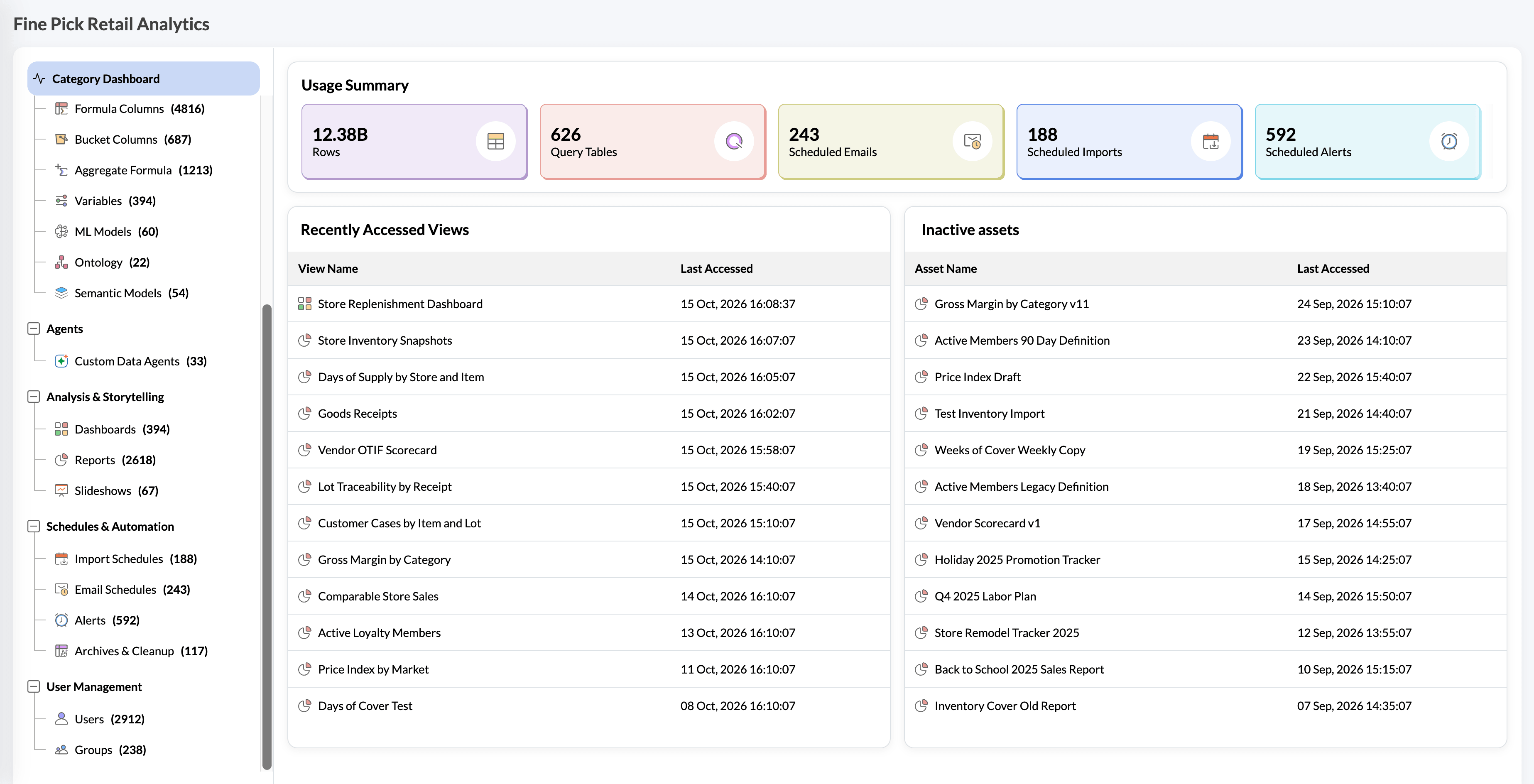
Governance built in
More agents means more questions about what they’re doing. These tools give admins central visibility and control.
Data Catalog
Every asset, including data, metrics, reports, dashboards, models, users and pipelines, sits in one catalog. Zia-powered search, filters and tags make assets easy to find, and data quality checks show what needs attention at a glance. Lineage shows how data flows and what a change will affect before you make it. You can also manage data and access policies from the same place.
Sandbox and deployment management
Build and test reports, dashboards and agents in a development environment that’s separate from production. Ship changes only when they’re ready, and roll back to an earlier version if something goes wrong.
Data Policies
Define access once at the table, column and row level, assign it to users or roles, and enforce it across reports and dashboards. A sales rep sees only their region’s data, and admins spend less time managing permissions one report at a time.
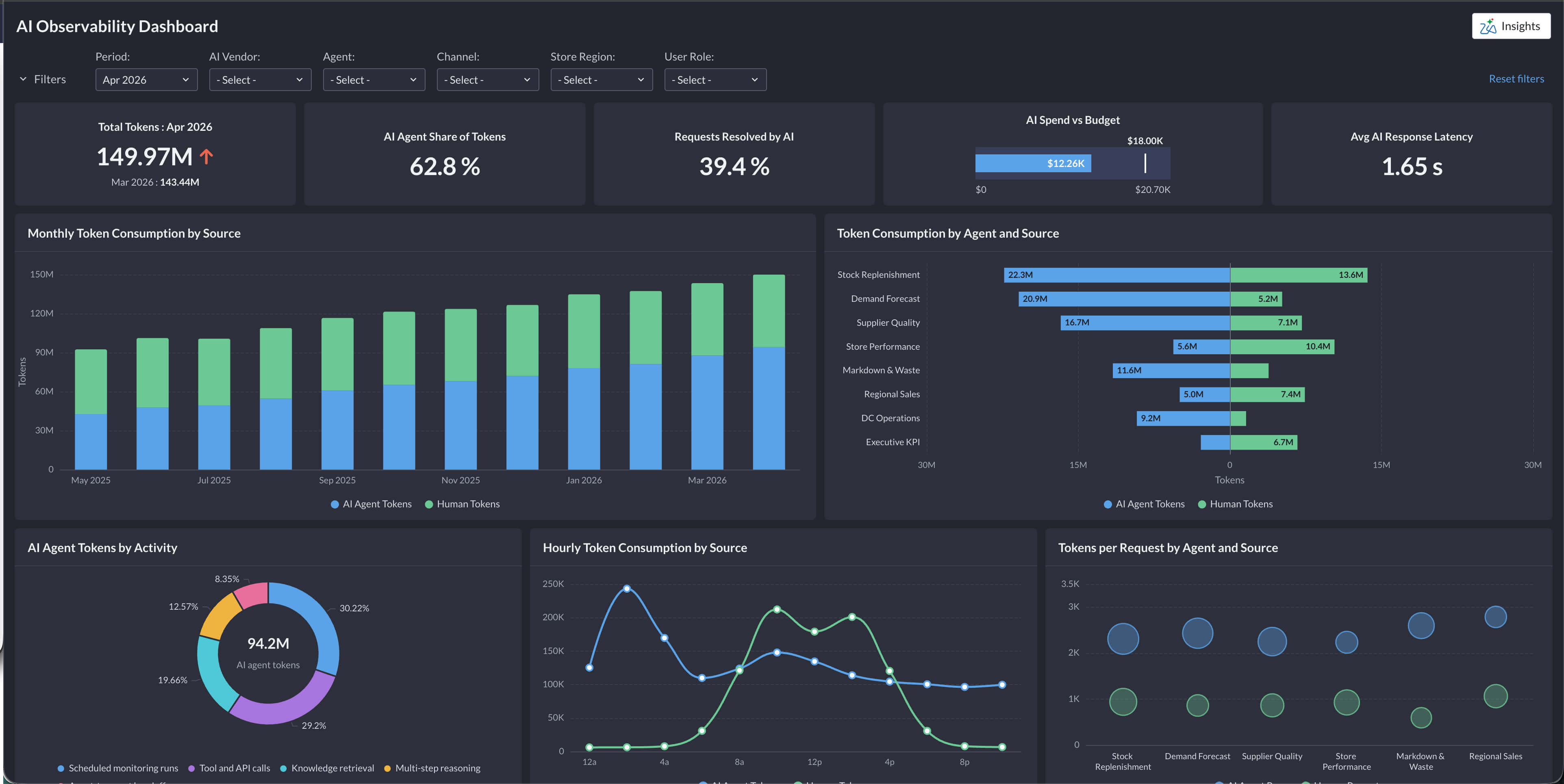
AI Observability
See which agents ran, who used them, what they accessed and how they answered. You can also track AI usage and cost across teams, and use admin controls to decide how Ask Zia behaves. AI Settings shows what each AI feature shares with external AI vendors.
More updates
Mobile
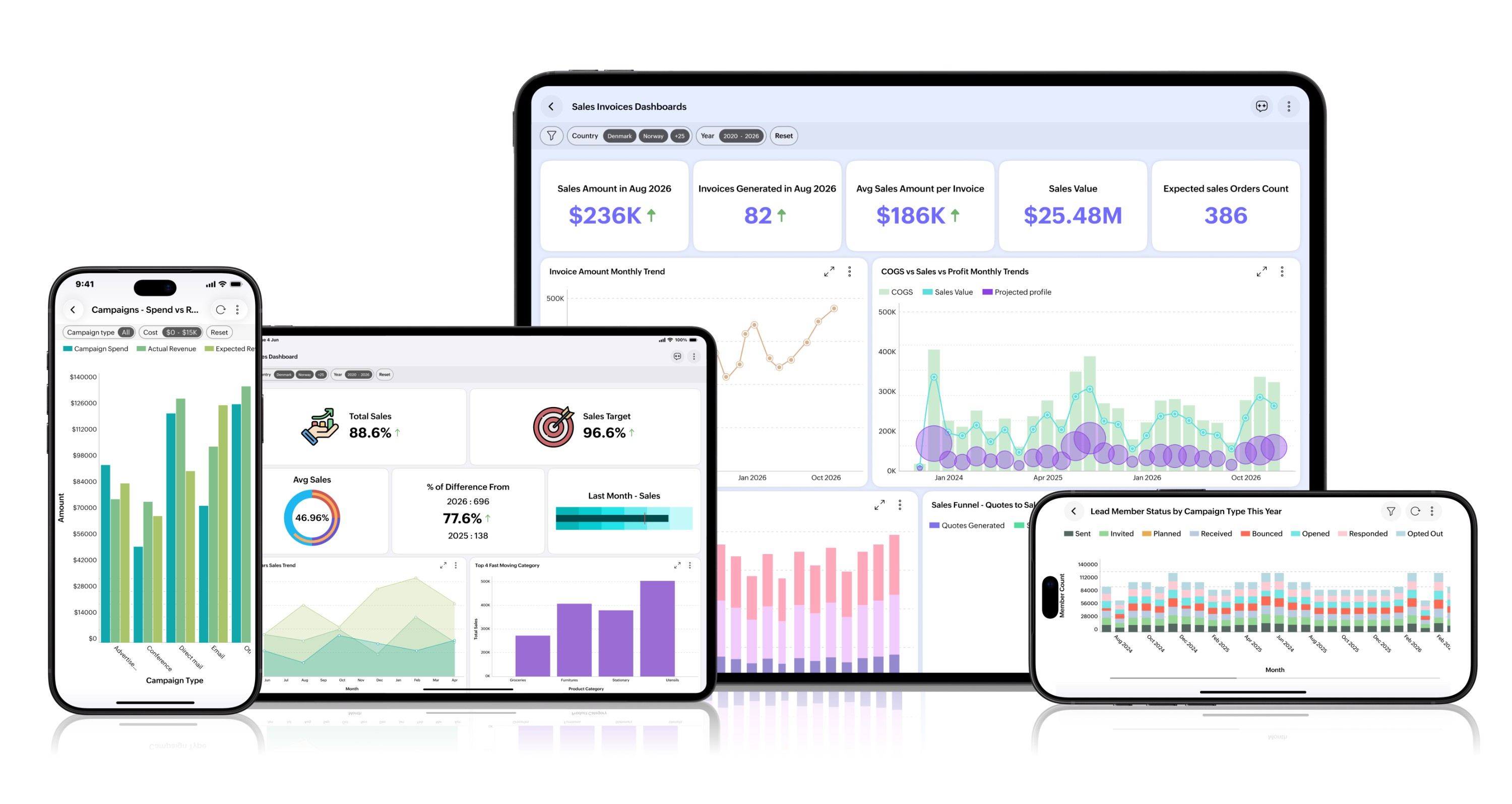
The iOS app now supports Liquid Glass, and the Android app has moved to Material 3, so both match the latest platform designs. Ask Zia comes along too, so you can ask questions about your data from your phone.
Search
Find analytics assets across all your workspaces by owner, tags and column names, instead of searching one workspace at a time.
Streaming data
Analyze live data from streaming sources like Google Cloud Pub/Sub and Amazon SNS in real time, and retain selected streaming data to revisit later, so you can compare today’s real-time numbers with last month’s.
Pipelines
Data pipelines can now append new rows to an existing table or replace its data with each run, instead of creating a new table every time. Your reports and dashboards stay pointed at the same up-to-date table.
For the complete list of what’s new, visit the What’s new page.
What’s next
This release lays the foundation, and more is on the way. Coming enhancements include:
- Dynamic business context: The ontology and semantic layer will update automatically as your business data changes.
- Decision intelligence: As agents take actions, Zoho Analytics will learn from the outcomes and use them as additional context for future answers.
- Greater openness: Continued work on open standards, including Apache Ossie, integration with semantic models defined in other platforms, and more of the platform available to outside agents through MCP.
- A unified data platform: Zoho Analytics will become the foundation of an upcoming data platform that brings together a data lakehouse, data integration, data preparation, business context, analytics, data science and agent building.
Pricing and availability
Pricing for Zoho Analytics hasn’t changed. Every plan now includes monthly Zoho LLM credits, plus a one-time Zoho Key System (ZKS) pool for leading external AI models. Add-on credits are available for heavier use. The Basic plan which covers 2 users and 0.5 million rows, now offers 10,000 Zoho LLM credits. See full pricing.
The new capabilities are available in the cloud now and are opening up gradually across regions and users. Preview versions of pixel-perfect reporting, the ontology and the semantic model will roll out globally over the next four to eight weeks. The on-premise version of Zoho Analytics will get these updates in Q1 2027.
Want a walkthrough? Join our product leadership for a launch session on October 29, 2026. Register for the launch event.
Try Zoho Analytics today. No credit card required.
Comments