Zoho Calendar MCP: Skip the clicks, just ask your calendar

Chuck Brooks, a globally recognized thought leader, declares AI as the 21st century force multiplier. It’s driving productivity and increasing output. AI has evolved past the simple query-and-answer phase. It could run multi-step workflows on your command, but it still operated in isolation and lacked your business context.
Pairing a powerful AI with your business calendar can simplify scheduling and reduce manual work, but integration was always the hard part. Connecting them required writing custom code that could break at any time and was not scalable.
Enter MCP—an open standard that bridges this gap by securely connecting AI assistants to business tools. With Zoho Calendar MCP, you can give your AI assistant complex instructions and it will execute them on your command.
What is Zoho Calendar MCP?
Managing a calendar becomes chaotic as your business grows. Referencing a past event, crafting an agenda, finding a time that works for everyone before a team meeting—these tasks quietly eat into your day and reduce efficiency.
With Zoho Calendar MCP, you can handle all of this at the speed of a prompt. Just describe what you need in natural language, and MCP will execute multi-step workflows directly in Zoho Calendar.
What can you do with Zoho Calendar MCP?
On average, 4.2 meetings per week are rescheduled per employee due to a lack of mutual availability, creating a cascading ripple effect. The constant back-and-forth to find a time that works for everyone becomes a barrier to deep work.
Zoho Calendar MCP eliminates this barrier by simplifying your daily workflow. Just speak with your calendar in natural language and it will execute multi-step actions on your behalf.
Manage and reschedule events with a single prompt
Juggling multiple projects and managing your calendar is now as easy as saying what you want. Tell your AI assistant, “Move my team meeting from Thursday at 2:00 PM to Friday at 3:00 PM, and add a note that the main agenda is to discuss server costs.”
The MCP server reads your calendar, finds the team meeting, reschedules it to the new day, and adds your agenda as a note—all from a single prompt.
Pain points solved:
- Skip the endless clicks to set up a single meeting.
- Stop missing events spread across multiple calendars.
Work with efficiency across multiple calendars
Creating separate calendars in Zoho Calendar is essential for keeping work, personal, and other priorities organized. Managing them is easy until you confidently schedule a meeting in a “free” slot, only to discover you’ve double-booked yourself with your kid’s soccer practice on another calendar.
With Zoho Calendar MCP, you can simply say, “Check all my calendars, find a slot when the other participants and I are free on Tuesday afternoon, and create the event.” No more cross-referencing calendars manually or accidentally double-booking yourself.
Pain points solved:
- No more double-booking.
- Eliminate wasted time on scheduling.
Find participant availability with ease
We’ve all played meeting roulette: “What time works for everyone for a quick sync?” followed by 27 messages and countless reschedules. Throw in participants from different time zones and you’ve got yourself a scheduling nightmare.
Skip the hassle and schedule meetings with a single prompt. Calendar MCP checks free/busy slots across all participants and creates the event. No need for a scheduling poll that eats up an entire afternoon.
Pain points solved:
- Reduce time zone errors in team meetings.
- Skip the tedious search for a common meeting time.
Share your calendar and manage permissions
You’ve time blocked your entire day to make progress on that one big project only for a meeting conflict to swing in like a wrecking ball and demolish your productivity. It’s a universal problem, and until now, there hasn’t been a meaningful solution.
Just prompt your AI assistant to share your work calendar with the right person, complete with custom permissions that let them check your availability and book a slot. No more breaking focus or switching apps to find a common meeting time.
Pain points solved:
- Protect your deep work block from interruptions.
- Share calendars without the runaround.
Zoho Calendar MCP capabilities
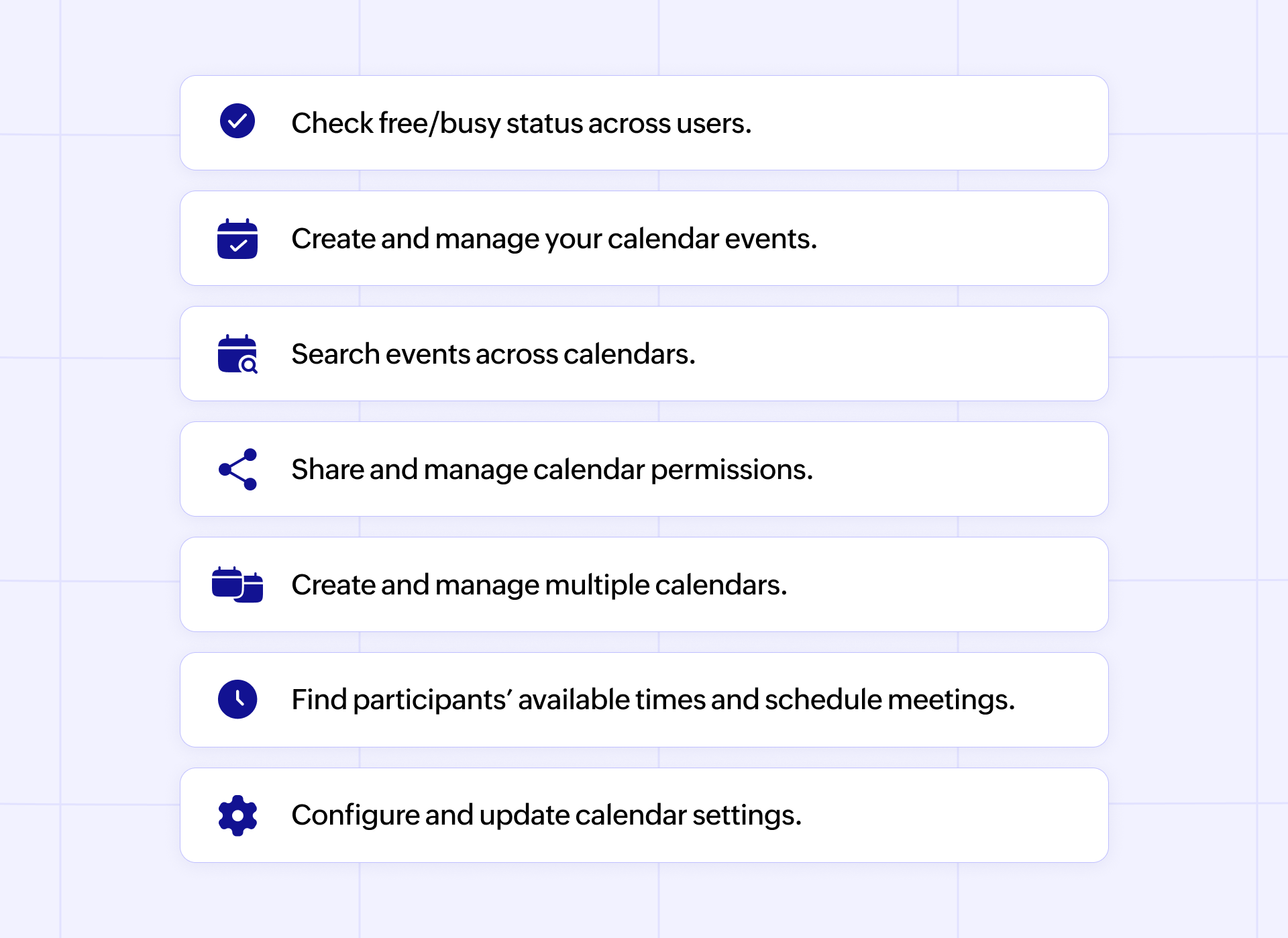
Addressing common concerns with AI
Letting AI manage your calendar raises fair questions, especially given MCP’s ability to add, edit, and remove events. Here are some common concerns and why they shouldn’t worry you.
Do you stay in control of what AI does?
Asking an AI assistant to make changes to your calendar can sound like surrendering control and hoping for the best. But with MCP, you stay in control. Zoho MCP uses OAuth 2.0 to authenticate user access level, which cannot be bypassed by AI assistants even if the prompt says so.
Can MCP activity be audited?
Letting MCP make changes to your calendar without an audit trail would be daunting. That’s why MCP is auditable by design. Every tool call goes through a structured request-response cycle that can be logged. Financial companies like Bloomberg and Block who are operating in heavily regulated industries are already running MCP in production with full compliance.
How secure is Zoho MCP?
Zoho Calendar MCP follows Zoho’s enterprise-grade security standards. Every action and data request is governed by role-based access controls, encrypted data handling, and full audit logging.
How can MCP help you?
Zoho Calendar MCP is for businesses, teams, and individuals looking to get more done with fewer clicks and less context-switching. Here are a few examples of how it makes a difference across different roles.
Developers and AI power users
These users already rely on AI assistants for coding and workflow automation. Zoho Calendar MCP lets them harness that same level of efficiency to meeting scheduling.
Use case: When they’re deep in a code review or a focused coding session and someone requests a meeting, they can ask their AI assistant to find a free slot and send the invite without breaking flow.
Frequency: Multiple times a day. They’re already in the AI assistant environment, so using MCP becomes second nature.
Executive assistants
Executive assistants carry a critical responsibility: keeping their leaders’ hectic days running without a hitch. They manage multiple calendars, handle constant reschedules, follow up on chats, and reference past events across different calendars. Zoho Calendar MCP brings calm to this chaos by turning multi-step calendar actions into a single prompt.
Use case: When they’re in a meeting with the CEO and a client requests a follow-up for the next day, the EA can use Zoho Calendar MCP to lock in a time that works for both instantly, without the dreaded “What time works for you tomorrow?” email chain.
Frequency: Multiple times a day. An EA’s work revolves around scheduling, rescheduling, and confirming events for the C-suite, so the calendar is where they live.
Team leads and project managers
These leads keep teams aligned and projects on track. But the meeting-heavy nature of their role turns scheduling cross-departmental syncs into a game of ping-pong that eats into their productivity. Zoho Calendar MCP eliminates that bottleneck.
Use cases: They’ll use every major capability of Zoho Calendar MCP—creating calendars, cross-referencing availability, searching events, and rescheduling when priorities shift. When a new project lands, they can type a single prompt to create a calendar called “Q3 Launch” and share it with the design team.
Frequency: Multiple times a day. Their work revolves around the calendar for team alignment, and cross-department coordination. Zoho Calendar MCP does the heavy lifting so they can focus on decisions, not logistics.
Fast-moving remote teams
Remote teams benefit from the flexibility of working wherever suits them best, but that freedom can lead to siloed work. The result is duplicate effort, poor coordination, and lost productivity.
Scheduling a cross-time zone team sync with colleagues in three or more regions can feel like solving a Rubik’s cube blindfolded. Zoho Calendar MCP makes this easy, too.
Use case: Distributed teams working across time zones greatly benefit from this. MCP lets them address overlapping work hours across time zones, partial calendar visibility, and recurring sync events that need constant adjustment as teams grow.
Frequency: Usage varies with daily priorities, but MCP’s multi-step capability comes through when it counts.
Client-facing and sales teams
These teams drive revenue, and timing is everything. They can’t afford to miss a beat because their calendars got out of hand. Zoho Calendar MCP gives them an edge by getting meeting invites out to prospects faster.
Use case: When they’re in the middle of a deal cycle and a prospect is ready to talk, they can fire off a prompt to find mutual availability and lock in the meeting while the momentum is high. No more losing days to email musical chairs.
Frequency: Sales and customer success teams may only use MCP a couple of times a week if their work doesn’t revolve around a calendar. But when they do, it delivers.
A look under the hood of MCP
MCP is how your AI assistant goes from “I understand what you want” to “I just did it for you in your calendar”. It’s like USB-C for your AI assistants to connect with your business tools in a secure way.
Here’s how MCP looks like on the inside to make things happen across applications with simple prompts—no custom code required.
The three components
Every action that happens through MCP has three components when you say “Find a time when both Alice and Bob are free next week for a 1-hour meeting.”
1. The host
This is the AI assistant—Claude, ChatGPT, Gemini, or VS Code—that you’re talking to. The host handles the thinking based on your prompt.
Example: Claude receives the user’s scheduling request.
2. The client
The client is the invisible bridge between the host and the server. Whenever you enter a prompt, the host creates a client that speaks MCP, which uses JSON-RPC for communication with the Zoho Calendar MCP server.
Example: Claude’s MCP client takes the request and sends it to the Zoho Calendar MCP server.
3. The server
This is where the actual work shows once the client speaks with the MCP server. The server connects to Zoho Calendar’s APIs and exposes actions and data that the AI agent can use securely through OAuth 2.0 authentication.
Example: Zoho Calendar’s MCP server checks Alice’s and Bob’s free/busy status, finds overlapping availability, and sends back the open slots.
The three primitives
The MCP server draws on three core capabilities called primitives. Which ones it uses depends on your prompt and what you need.
1. Resources: The read-only layer
Resources are read-only and don’t take any actions. If you query your calendar for information, the AI can fetch that for you. This primitive gives the agent the context it needs to make smart decisions.
The scope of Resources: Fetching calendar events, user preferences, timezone settings, and checking participant availability.
2. Tools: The action layer
This is where the AI alters the state and makes changes to your calendar when your prompt calls for it. The AI model acts with a clear understanding of the request translated from the user prompt by the MCP client.
The scope of Tools: Create, update, or delete events, share calendars, manage permissions, and configure notification settings.
3. Prompts: The template layer
These are structured interaction templates that are populated based on user input. They help the server present information to the AI in the right format to ensure consistent and predictable behavior across different requests.
Getting started is easy
Zoho Calendar MCP can do wonders for your everyday scheduling needs and makes managing multiple calendars easy. Setting it up is easy—there’s no coding required. Get started in three easy steps.
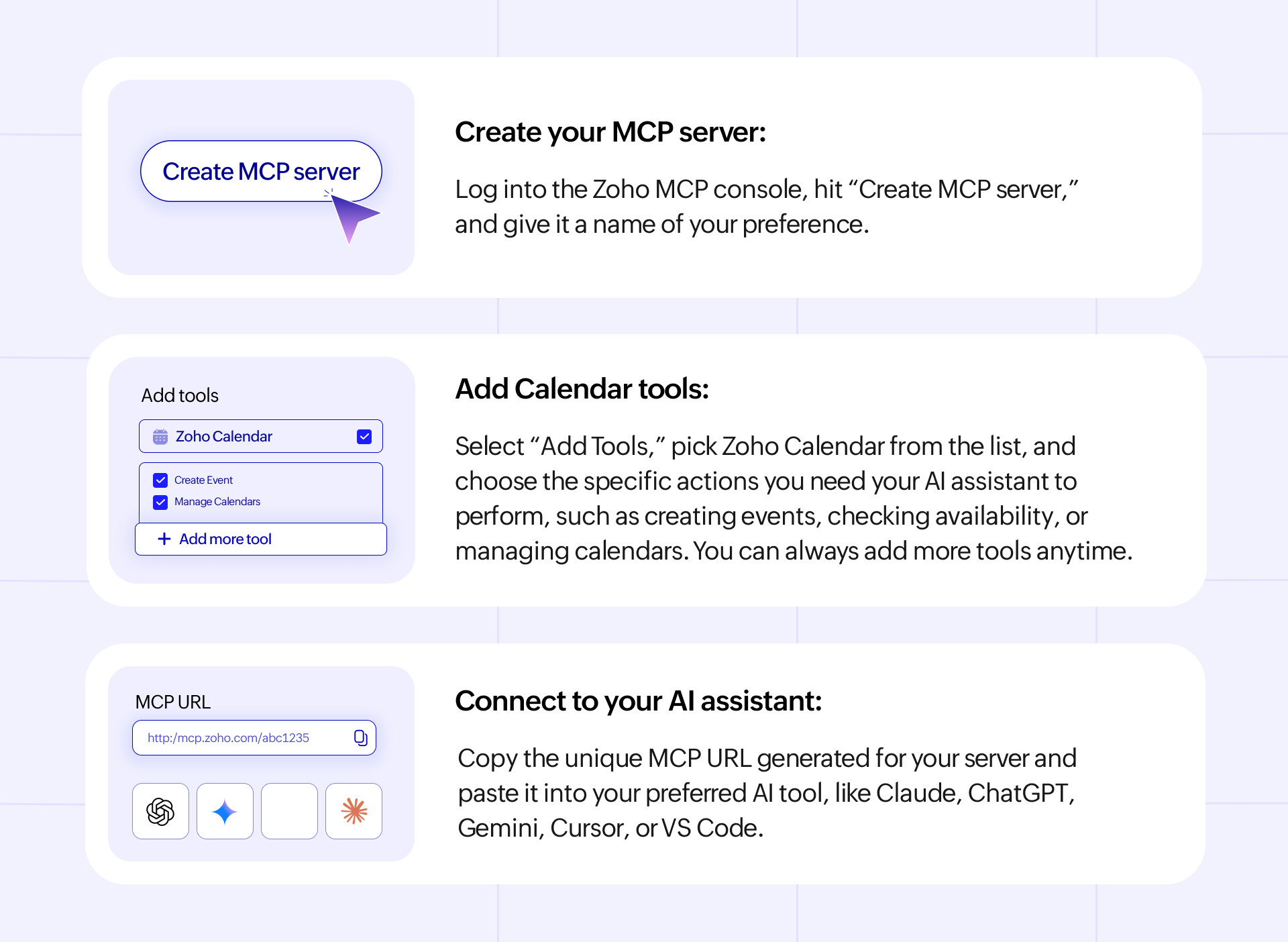
You’re all set! Now you can talk to your AI assistant and get things done on Zoho Calendar in natural language.
Check out our detailed guide to setting up Zoho Calendar MCP and getting started.
Find the right tools for any action and build workflows with the Zoho Calendar MCP tool finder.
Summing up
The calendar tax is real, and businesses of all sizes pay a premium for it every year. Small things like manually checking event details, finding a common meeting time, and rescheduling events all stack up. They cost money and productivity.
Zoho Calendar MCP cuts through this inefficiency by connecting your AI assistant to your business calendar, letting it act on your prompts, and doing the work for you. Your calendar already knows you. Now just ask it to work for you.

Comments