How to Build Your Agentic Data Foundation with Zoho Analytics and Zoho DataPrep

Parts 1 and 2 covered why agents need a data foundation and what the right architecture looks like. This post gets into the how.
If you're a Zoho customer, the path to building the right AI agents is shorter than you might think because most of the tools are already at your disposal.
Step 1: Bring Data Together
The starting point is getting your data out of individual apps and into one place. Zoho Analytics handles this through prebuilt connectors for the full Zoho suite, and third-party sources. Data syncs on a schedule you configure, with no custom code required.
Don't try to connect everything at once. Work backward from the questions you want your agents to answer:
- Sales agent: Zoho CRM + Desk + Books for a full customer lifecycle view.
- Marketing agent: Zoho CRM + Campaigns + Social + web analytics to tie campaign activity to pipeline.
- Finance agent: Zoho Books + Inventory + Payroll + Expenses etc.
Step 2: Transform Data with Zoho DataPrep
Data rarely arrives clean. Names get spelled differently across systems, formats vary, and then there are duplicates to deal with.
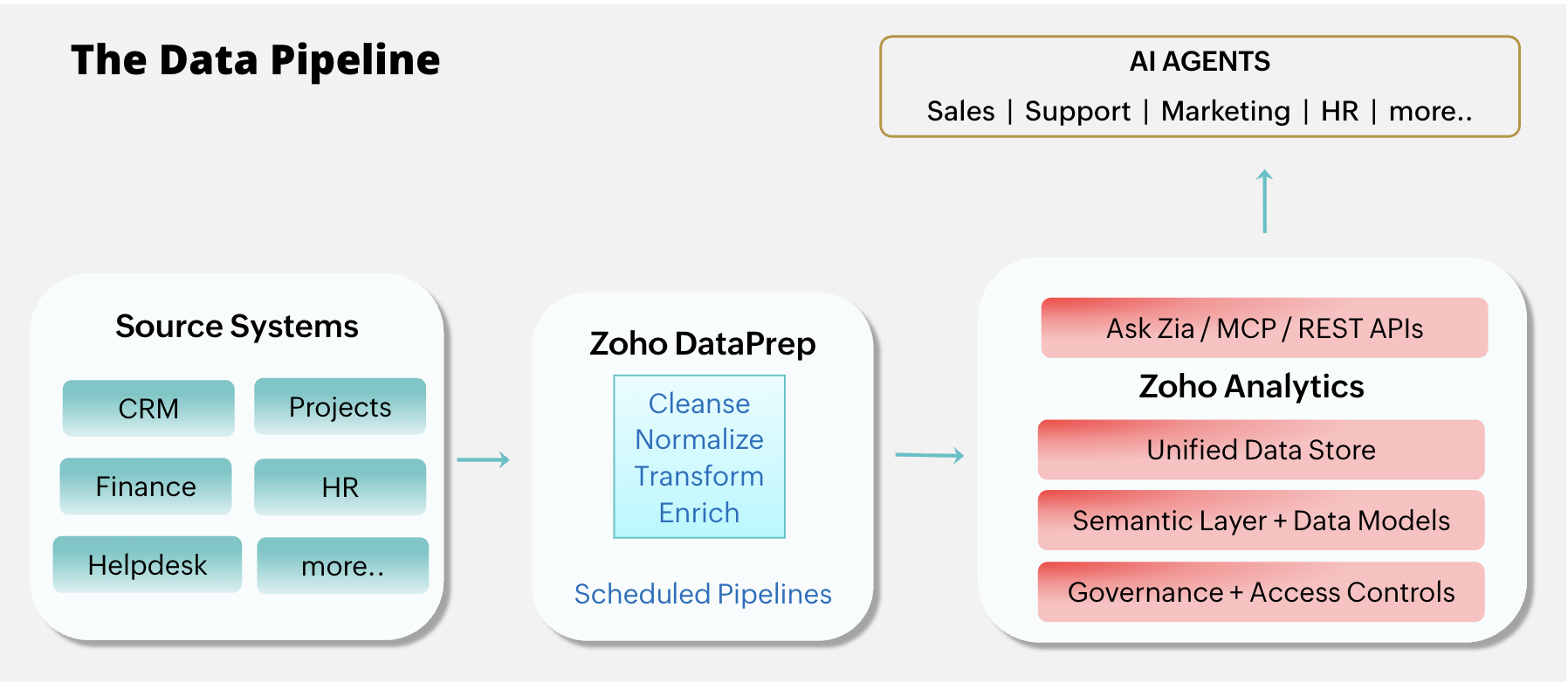
Zoho DataPrep sits between source systems and Zoho Analytics, handling the cleanup that makes unification possible. It standardizes records (so "Acme Corp" and "ACME Corporation" become one customer, not two), enriches data by merging columns and adding calculations during transformation, and filters out test records and stale entries.
Scheduled pipelines keep all of this running automatically as new data flows in.
Step 3: Define Your Semantic Layer
Once data is unified and clean, model it. This is where raw tables become business-ready definitions that both agents and people can query reliably.
Start by defining relationships between datasets using lookup columns, so an agent answering "How is Customer X doing?" can pull deals, support history, and payments from one linked model. On top of that, define your business metrics as formulas, "Revenue," "Account Health Score," "Net Retention," so every agent picks up the same definition instead of interpreting them on the fly. Finally, build reusable summary views (revenue by segment, ticket volume by account, pipeline by stage) that agents can query directly. This is the step that separates agents that give consistent answers from agents that interpret data differently every time.
The full pipeline: Source systems → Zoho DataPrep → Zoho Analytics → Ask Zia / MCP / API → Agents
Step 4: Build Your Agentic Solution
With a strong data and semantic foundation in place, you can use the following extensibility features to build agentic solutions on top of it.
Ask Zia: Agentic Analytics Built In
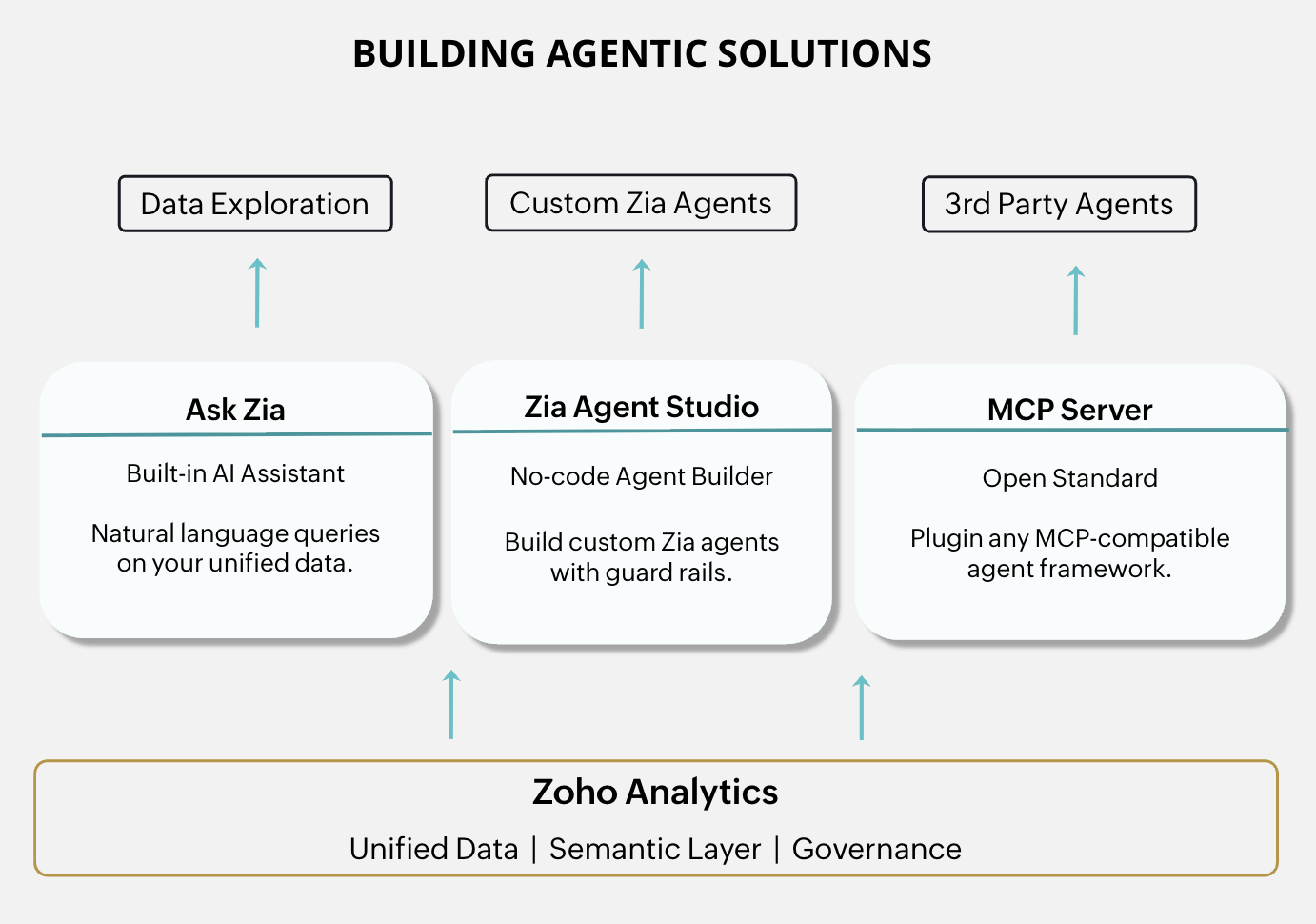
The fastest start is the AI assistant already inside Zoho Analytics. Ask Zia lets your team explore your unified data in natural language, working directly on the models and definitions you built in Step 3. It's a useful step before building anything custom: validate your semantic layer with real questions, spot gaps in your data models early, and get your team comfortable with AI-driven exploration on familiar ground.
Zia Agent Studio: No-Code Custom Agents
When you're ready to move beyond exploration into purpose-built agents, Zia Agent Studio is Zoho's no-code agent builder. Describe what you want the agent to do in plain English (or configure it manually for more control), point it at your data and tool groups, set guardrails, and deploy. Agents built in the Studio can be deployed across the Zoho ecosystem, exposed through Ask Zia, or even published to the Agent Marketplace.
Because Zoho Analytics is part of your data foundation, agents you build here can draw on the same unified records, semantic definitions, and access controls. A Revenue Growth Specialist agent doesn't have to reinvent what "Account Health Score" means. It uses the one you already defined.
MCP: Standard Agent Connectivity
For custom agent frameworks, the open standard to know is MCP (Model Context Protocol). Zoho Analytics has an MCP Server (with source on GitHub) that exposes your datasets, respects your access controls, and returns structured results to any MCP-compatible agent. If you're working across the broader Zoho ecosystem, the Zoho MCP platform extends the same model across other Zoho apps. For more specialized needs, you can also use the Zoho Analytics API.
Examples of what you can build
Combine these and you can build:
- A customer success agent monitoring account health across support, billing, and usage data
- A finance agent combining Zoho Books actuals with CRM pipeline for rolling forecasts
- A marketing agent combining Zoho Campaigns data, ad platforms' (Google Ads, Meta Ads, Microsoft Ads etc) data with Zoho CRM data to get the full conversion cycle reports.
Each draws from the same foundation. Build the data layer once, and start running multiple agents on top of it.
Step 5: Govern and Observe
Routing agent data through Zoho Analytics gives you one point of control. Instead of managing permissions, audit logs, and credentials across every source system independently, governance happens in one place. That shows up in three ways. Access control is scoped at the data layer, not in a prompt where rules can be worked around. Observability gives you a clear view of what each agent queries, how often, and lets you trace any bad answer back to the data and definitions behind it. And because sync schedules are managed centrally, every agent sees consistently fresh data without each one deciding for itself.
There you have it. Each layer has a clear job. Zoho DataPrep ensures data quality. Zoho Analytics handles unification, meaning, and governance. Ask Zia and Zia Agent Studio provide built-in exploration and agent building. MCP and APIs open up agent access. The agents themselves focus on reasoning and action.
The infrastructure side is now in place. In Part 4, we'll tie it all together with an adoption path: where to start, how to phase it, and what to watch out for.

Comments