Start Your Agentic AI Journey Today

This is the fourth and final part of the agentic data infrastructure series.
You now know why AI agents need a data foundation, what that foundation looks like, and how to build the foundation with tools like Zoho Analytics, Zoho DataPrep, Ask Zia, and Zia Agent Studio. The remaining question is a practical one: where do you start? This post answers how you can go about it in three simple stages.
Stage 1: Use What You Already Have
Zoho Analytics includes Ask Zia for natural language queries. Activate it across your workspaces. It does three things: gets your team comfortable with AI-driven data interaction, validates your data models (bad answers mean there are gaps to fix), and builds buy-in for further investment.
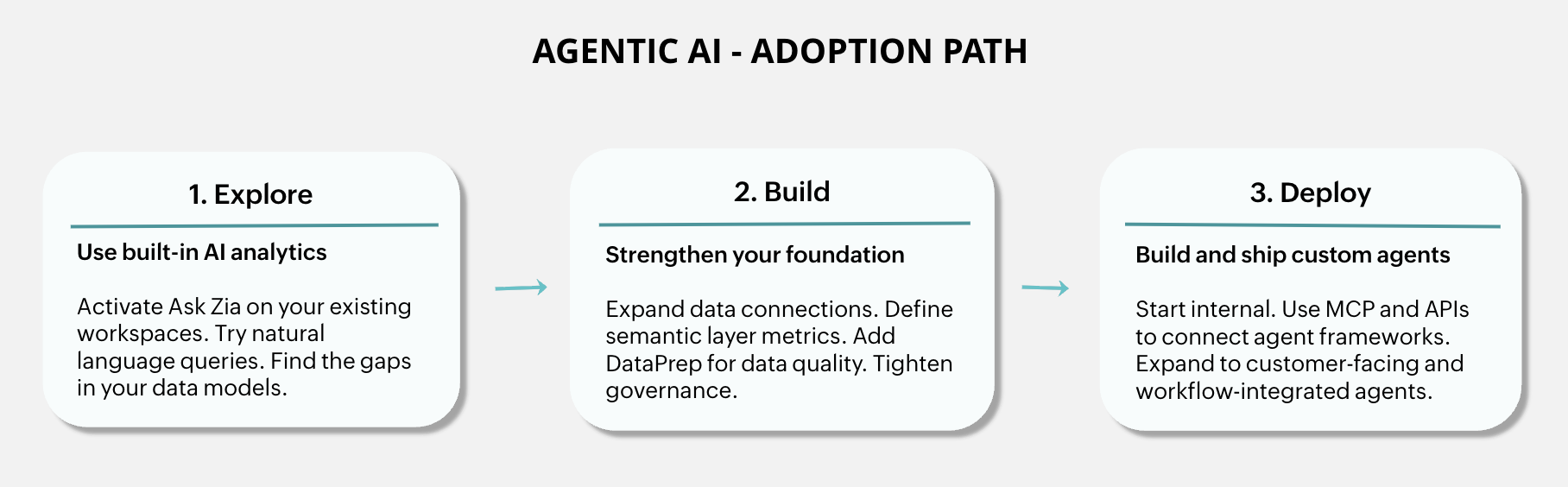
Stage 2: Build the Foundation
Expand data connections. Go from three sources to ten. Add Zoho apps data and key third-party sources using Zoho Analytics' prebuilt connectors.
Model relationships between datasets. Zoho Analytics lets you link related tables through lookup columns and data models, so customer records in CRM connect to their support tickets, invoices, and usage data. Once these relationships are in place, an agent answering "How is Customer X doing?" pulls from one connected view, not three disconnected ones.
Define your semantic layer. This is more than just metrics. Start with calculated fields for the numbers that come up most in leadership reviews. Like active customers, revenue, health score etc. Then add the business relationships agents need to reason about your domain (how accounts map to territories, which products belong to which lines, how teams roll up). Finally, add synonyms and aliases so an agent recognizes that "ARR," "annual recurring revenue," and "yearly subscription value" all point to the same definition. Every definition you add makes your data more agent-ready.
Add Zoho DataPrep pipelines. Use Zoho DataPrep to standardize naming, deduplicate records, and fix format mismatches. Especially important for customer and financial data.
Tighten governance. Review your permission model with agent access in mind. Set controls before agents go live, not after.
Stage 3: Build and Deploy Agents
With the foundation in place, Zoho Analytics gives you four ways to build agentic solutions on top of it. Ask Zia works out of the box for natural language exploration. Zia Agent Studio lets you build custom no-code agents that draw on your unified data and semantic definitions. MCP opens the same foundation to any third-party agent framework. And the REST API handles bespoke integrations where you want full control. Use whichever fits the use case. Most teams end up combining them over time.
Start internal. A sales intelligence agent pulling unified customer data. A finance agent combining actuals with pipeline forecasts. Lower stakes, room to iterate.
Expand outward. Customer-facing support agents. Onboarding agents. Workflow-integrated agents that create tasks and open tickets based on data signals.
Why Incremental Beats Greenfield
Building from scratch is slow, risky, and ignores what you already have. If you're a Zoho Analytics customer, your data connections, models, and access controls are a head start, not overhead. The incremental approach lets you learn as you go and deliver value at every stage.
Your Starter Plan
If you're ready to begin, here's a simple four-step plan to get from where you are to a working agentic data foundation.
1. Audit your data connections. What's in Zoho Analytics today? What's missing? Identify two or three sources that would unlock more useful agents.
2. Try Ask Zia on your existing data. Ask it the questions your leadership team asks most. Note where answers are accurate, where they need refinement, and where they miss entirely. Those gaps are your semantic layer roadmap.
3. Pick one agent use case. Choose a single scenario where unified data would save real time or improve decision quality. Map what data it needs, what semantic definitions are required, and which integrations you'd build.
4. Build and test with Zia Agent Studio or your preferred framework. Start small. Get the first agent working end to end. Use what you learn to refine your data models, expand your semantic layer, and plan the next one.
Not yet on Zoho Analytics? Prebuilt integrations mean you can have a unified data layer running in days. Everything you build for analytics becomes the foundation for agentic AI. The infrastructure for agentic AI is an evolution of what good analytics teams have built for years. Start now. The next chapter is already taking shape.
What's Ahead
We're building additional capabilities that will extend the agentic data foundation further. Deeper data harmonization, richer contextual layers, and a common data platform that brings these together across the Zoho ecosystem. These will arrive as natural extensions of Zoho Analytics, so the foundation you build today gets stronger over time without re-architecture.

Comments