Automate CRM data hygiene with ETL pipelines

A CRM is only as useful as the data inside it.
Even the most expensive automation or workflows deliver the wrong results when the CRM is filled with duplicates and inconsistent values. Clean data is not just nice to have—it’s what allows a team to actually trust the tools built for them.
The challenge is simple: CRM data doesn’t stay clean on its own. It changes daily as new leads are added, representatives update records, imports are uploaded, and connected apps sync information into the system. Without a clear process, the CRM gradually becomes less trustworthy.
That's where ETL for CRM makes a real difference. Instead of relying on manual cleanup projects, teams can build workflows to clean, standardize, and enrich their CRM data automatically.
In other words, they can automate CRM data cleaning instead of fixing the same issues weekly.
Why CRM data hygiene matters
Most teams notice bad CRM data only after it starts affecting their daily work: a report looks wrong, a lead gets assigned twice, or a workflow is missing records because required fields are blank. Sales and marketing lose confidence in the data, and once that happens, CRM adoption starts to slip too.
The hard truth is that if the CRM data hygiene drops, it directly impacts operations. It affects reporting, segmentation, lead routing, personalization, forecasting, and customer experience.tions.
What CRM data hygiene actually includes
When people talk about cleaning CRM data, they often think only about removing duplicates. In reality, managing duplicates is only part of the issue—the whole job includes:
Fixing incomplete records
Standardizing formats across teams and sources
Validating emails, phone numbers, and key fields
Enriching records with useful business context
Archiving stale or low-value data
Backing up data before major changes
Setting rules that prevent more bad data from entering the CRM
That’s why an ETL for CRM approach works so well. It handles the full data flow, not just one cleanup task.
The problem with manual CRM cleanup
Manual cleanup is slow, inconsistent, and hard to scale. It can work for emergencies, but when used as a long-term solution, it automatically eats into your employees' productivity hours.
When volume increases, employees have to deal with the same problems, wasting more productive hours on fixing issues that could be automated in just a few hours.
A practical CRM data hygiene framework
To automate the CRM data cleaning process, businesses need a process that runs continuously in the background. That means using ETL pipelines to extract data from various sources, transform it using rules, and load the cleaned version back into the CRM.
To effectively automate CRM data cleanup, you need to establish a practical data hygiene framework that defines exactly what happens to lead data from the moment it enters the CRM until it’s archived.
A clean CRM usually comes from doing a few things well and doing them consistently.
Step 1: Start with an audit
Start by mapping where CRM data is coming from, whether that’s website forms, campaigns, manual uploads, or integrations. This helps in spotting where the quality issues begin.
Then identify the data that actually matters to your business: the fields that sales, marketing, service, and reporting depend on every day.
Finally, review the current state of that data for duplicates, missing values, inconsistent formats, outdated records, and gaps in completeness.
This gives you a fair idea on how to start fixing the existing data and preventing bad quality data from entering your CRM system.
Step 2: Standardize what goes into the CRM
Once you know where the issues are coming from, the next step is to reduce bad data at the point of entry. Put rules around mandatory fields, naming conventions, form requirements, formatting, and duplicate prevention so records enter the CRM in a more consistent way.
Step 3: Back up CRM data before making major changes:
Before fixing CRM data, back up the information first. This simple step protects against accidental loss, gives the team the confidence to make large-scale changes, and ensures a reliable recovery point is always available if something goes wrong during the cleanup process.
Step 4: Clean, enrich, and segment your records
This is the stage where raw CRM data becomes truly usable. Instead of letting messy records pile up, this step focuses on systematically cleaning, enriching, and organizing CRM data so it can support reporting, targeting, and automation.
Using Zoho DataPrep’s Data Studio, we can automate these rules so every record entering the CRM undergoes the same preparation process.
Clean your CRM data
To fix the quality of the existing data, remove duplicate records, standardize formats, correct invalid entries, and fill missing values wherever there is a trusted rule or source.
Use Case
When syncing leads from multiple sources, contact names and dates might be entered in different formats, phone numbers may follow different patterns, or the same lead may appear multiple times due to form submissions and imports. Cleaning rules ensure these inconsistencies are automatically corrected.
Enrich your CRM records
Once the base data is clean, enrichment adds missing business context that makes CRM records more useful. This can include attributes such as industry, company size, job designation, geographic location, or revenue band.
Instead of manually updating records one by one, enrichment datasets can be applied in bulk to thousands of records at once.
Use case:
A sales team captures only basic information from a website form like name, email, and company. Using an enrichment dataset, the system automatically adds industry, company size, and region, giving sales teams more context to prioritize and score leads effectively.
Segment your CRM data
After cleaning and enrichment, the final step is organizing the data into meaningful groups that teams can act on. Segmentation allows businesses to categorize CRM records by lifecycle stage, geography, industry, engagement level, or account value.
This makes it easier for marketing and sales teams to target the right audiences and run more precise automation workflows.
Use case:
With industry and employee count added to CRM records, marketing teams can easily segment leads into SMB, mid-market, and enterprise categories, making it easier to run targeted campaigns and deliver more personalized outreach.
Step 5: Archive what no longer needs to stay active
Not every record should remain in the live CRM forever. A good rule of thumb is to archive leads that:
Haven't been active for over two years
Closed more than one year ago
Haven't engaged with marketing emails and messages for over one year
These leads can clutter the system and reduce the quality of reporting and pipeline visibility.
Archiving these records keeps the active CRM cleaner, more relevant, and easier for teams to work with while still preserving historical data when needed.
Step 6: Automate the hygiene process
The final step is turning all of this into an ongoing system. Set up automated workflows to back up CRM data regularly, clean and prepare incoming data, and move outdated or low-value records into archive flows.
This framework is what makes CRM data hygiene sustainable—not a one-time cleanup project but a repeatable process that keeps data reliable over time.
How Zoho DataPrep's ETL for CRM helps automate CRM data cleaning
At a basic level, ETL means extract, transform, and load.
For CRM, that means pulling data from one or more sources, cleaning and reshaping it, and then loading the trusted version into the destination system. It’s one of the most effective ways to automate CRM data cleaning because it turns cleanup into a repeatable workflow instead of a recurring manual task.
A good ETL for CRM setup can:
Detect and manage duplicates
Standardize fields and formats
Validate records before import
Enrich missing business information
Archive stale records automatically
Create backups for governance and recovery
Keep connected systems in sync with cleaner data
This is especially useful for businesses that rely on multiple sources feeding their CRM every day.
Four Zoho DataPrep ETL pipelines for CRM data cleaning
One of the most effective ways to automate CRM data hygiene is by setting up four pipelines that keep your CRM data clean, structured, and reliable.
1. Manual upload to CRM pipeline
This pipeline handles spreadsheets and files before they reach your CRM.
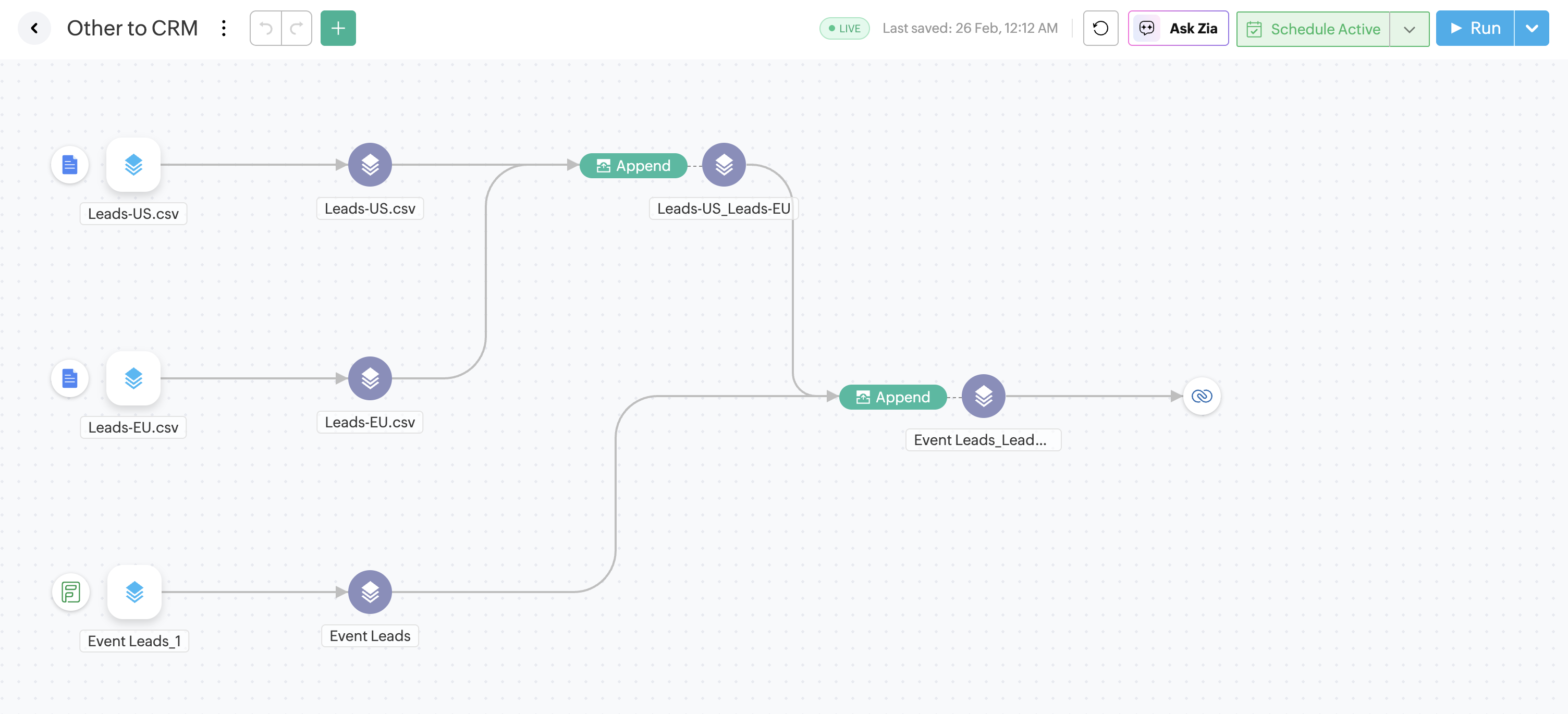
Lists from events, partner databases, field teams, or legacy tools often contain duplicates, inconsistent formatting, and missing fields. Instead of importing them directly, route them through a Zoho DataPrep layer first.
With the right data cleaning and preparation rules set up, you can standardize columns, validate formats, check for duplicates, and push only the cleaned data into your CRM.
This is one of the fastest ways to prevent bad data from entering the system as well as the quickest way to get leads into your CRM.
2. CRM to CRM archiving pipeline
Not all data should stay active forever.
A CRM-to-CRM archiving flow can move inactive leads, old closed-lost deals, unsubscribed and non-engaging contacts, or stale records into an archive environment based on rules. That keeps the live CRM lighter, cleaner, and easier to work with.
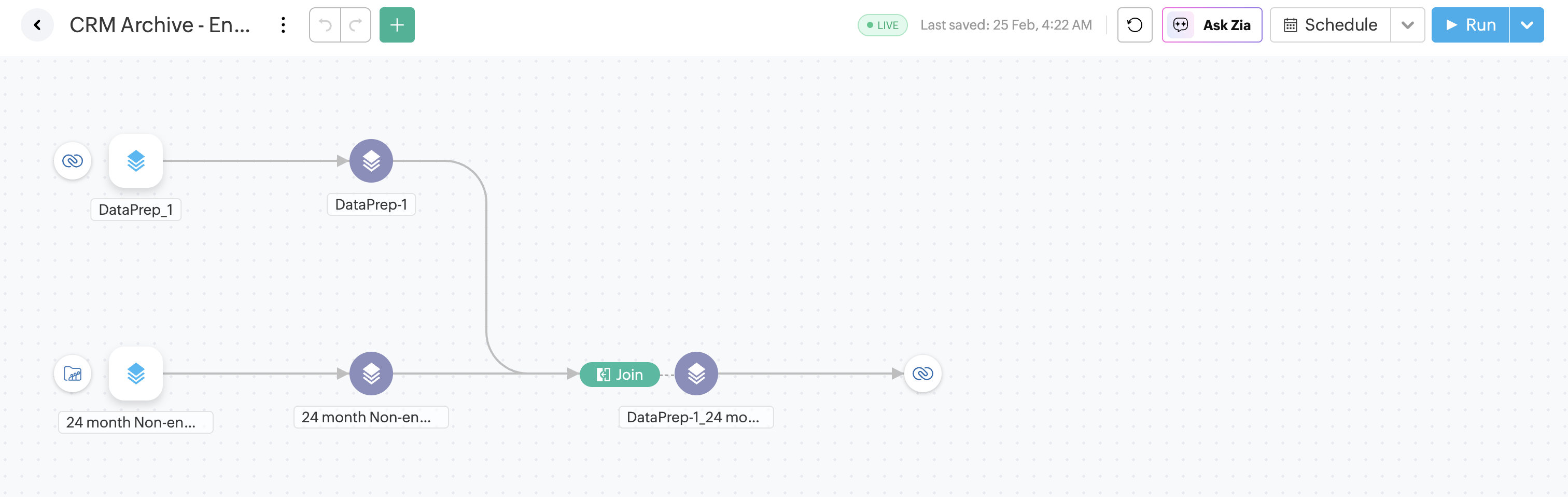
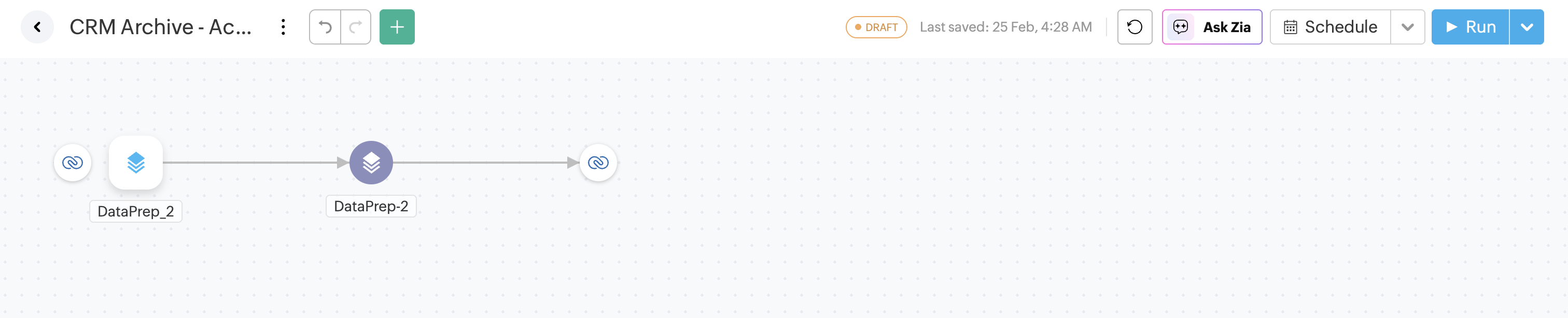
Some use cases might require multiple pipelines when data flows through different systems. In this example, we built two pipelines to segment leads and archive them.
Archiving pipeline 1: Segment closed and unengaged leads, and bring in data from email marketing tools to identify leads that haven't engaged with any of the marketing and sales emails.
Archiving pipeline 2: Push the archived leads to a separate module to fully archive them.
For long-term CRM data hygiene, archiving matters just as much as cleanup.
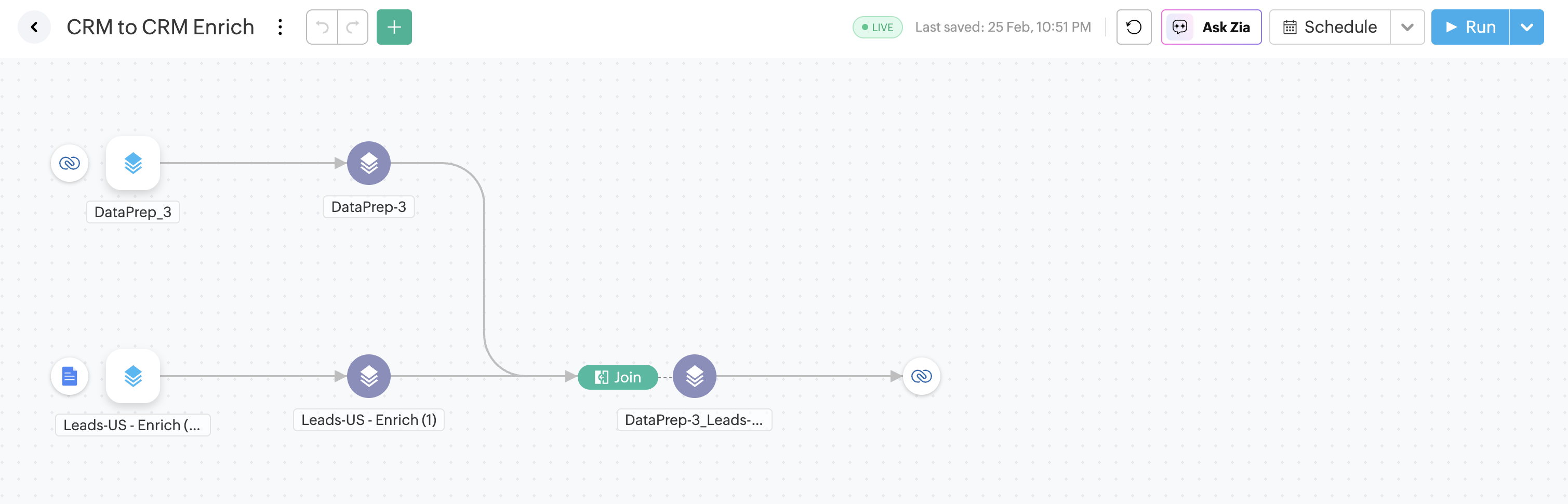
3. CRM to CRM automated cleanup and enrichment pipeline
This is the core pipeline for businesses aiming to automate CRM data hygiene and improve lead conversion. It periodically pulls CRM records, standardizes and validates fields, removes duplicates, corrects formatting issues, and flags incomplete entries. A key advantage of this pipeline is data enrichment. When a trusted enrichment dataset is available, thousands of CRM records can be enriched in one pass, greatly improving data completeness and lead scoring accuracy.
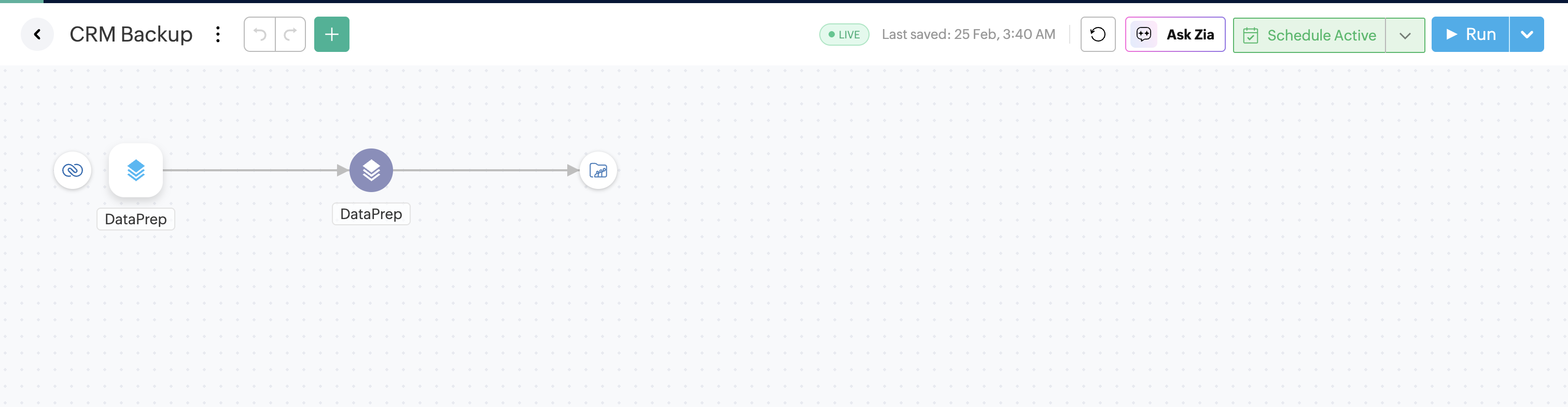
4. CRM to warehouse or drive backup pipeline
A backup pipeline moves CRM data into an external warehouse, lake, or drive for recovery, analysis, and historical tracking.
Why does investing in CRM data hygiene actually matter?
CRM data gets messy fast when it’s been accumulating for months or even years without proper checks. That part is normal. What really matters is whether there's a system in place to manage it.
A strong CRM data hygiene strategy helps teams trust their reports, run automation with confidence, segment customers more accurately, and work with cleaner, more reliable records every day. The most practical way to sustain this at scale is to automate CRM data cleaning through well-designed ETL workflows that continuously monitor, clean, and maintain data quality.
If you are looking to fix your CRM data hygiene, start your Zoho DataPrep free trial now.



Comments