Work smarter with Zoho Solo on iOS 27 and iPadOS 27

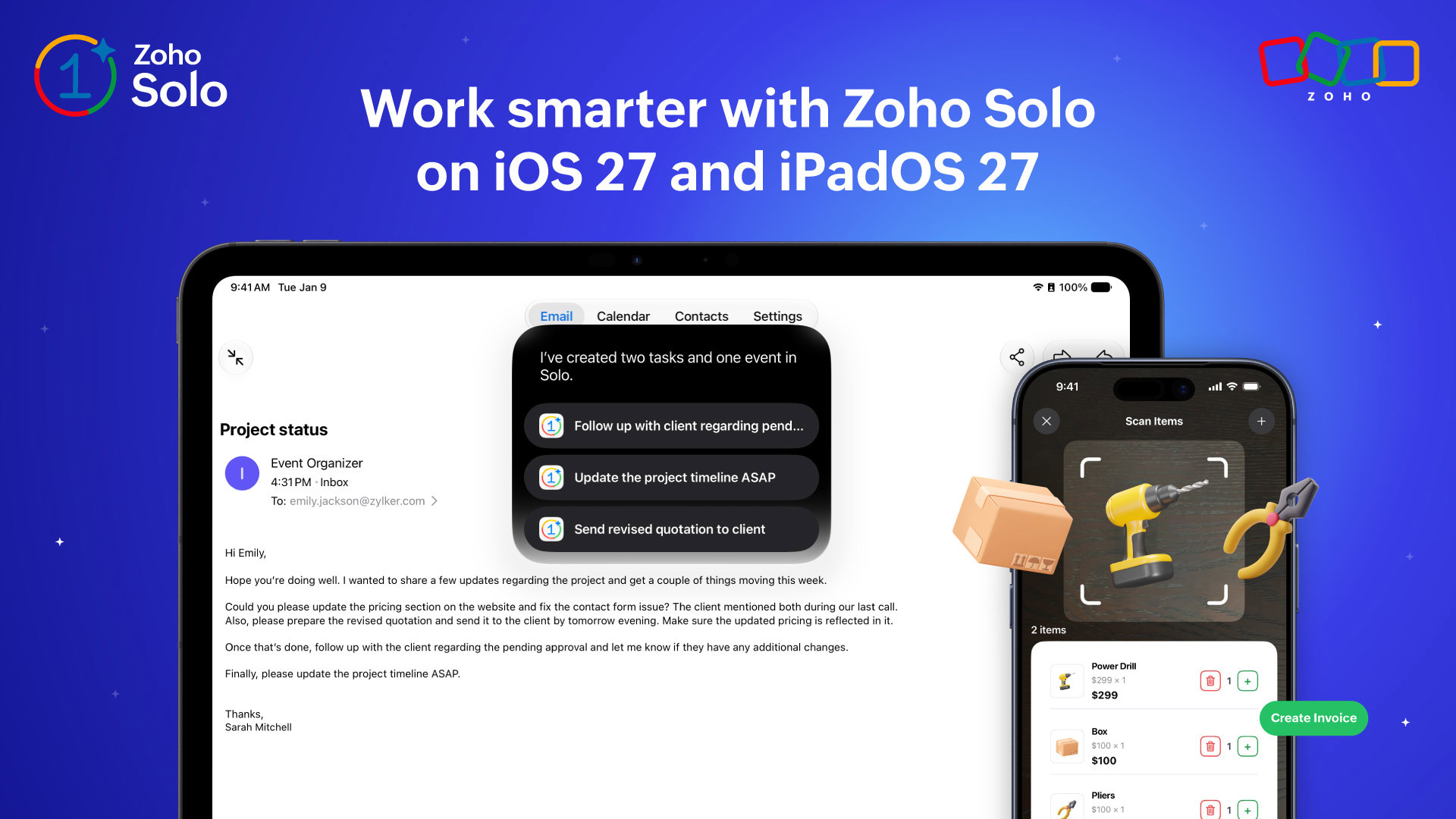
Every Apple release brings new possibilities for making everyday work simpler, and each year, we look at how those possibilities can fit naturally into a solopreneur’s day.
With iOS 27 and iPadOS 27, Zoho Solo can do more with the information already around you. From turning images and on-screen content into business records to finding what you need with natural-language search, these updates are designed to cut down the steps between information and action.
Here’s what’s new.
Turn what you see into action with Foundation Models
Business information can come from anywhere, including a brochure you pick up or a product sitting right in front of you. With Apple’s Foundation Models, Solo can understand what you capture and help turn it into useful business data.
Turn a brochure into an event
See an event you’d like to attend? Capture the brochure, and Solo can identify details such as the event name, date, time, and venue to prepare a new event for you. Review the details, save, and it’s added to your schedule without having to enter everything manually.
Create an inventory item from an image
Adding a new product to your inventory is just as easy. Capture an image of the product, and Solo can suggest details such as the item name, category, and description. Review the suggestions and add the item to your inventory in one tap.
Point, scan, and sell
Selling products can mean searching for each item, adding it to the sale, and entering quantities one by one. With Foundation Models and VisionKit, Solo makes this simpler. Just point your camera at a product or barcode to scan and add it to the sale. Adjust quantities as needed, keep scanning, and bill when you’re done.
Turn customer requirements into action with On-Screen Awareness
Customer requirements can come through emails and other apps you use every day. With On-Screen Awareness, Solo can understand the information you’re already viewing and help turn it into action without having to enter the details again.
Turn emails into events and tasks
A customer email can contain more than just a message. It could include an appointment to schedule or work that needs to get done. Using the details already on your screen, create events or tasks in Solo and keep customer requirements moving forward without manually re-entering them.
Save important details as a note
Come across customer details or other useful business information while working in another app? Use the content you’re viewing to create a new note in Solo, so important information is easy to capture and refer to later.
Find inventory with Visual Intelligence
Sometimes you know what you’re looking for, but remembering its exact name in your inventory is another story.
With Visual Intelligence, scan an item or its barcode to find the corresponding item in Solo. When Solo appears among the relevant results, open it to quickly access the matching inventory record and its details.
Whether the product is in front of you or you’re trying to identify something from its barcode, finding the right inventory item can start with a scan.
Search the way you naturally ask
Finding a business record shouldn’t depend on remembering exactly where it’s stored.
With natural-language search in Spotlight, you can search for Solo information using everyday language. Look for overdue tasks, upcoming events, files, and other records, and get the relevant results instantly.
Simply search for what you need and spend less time navigating to find it.
Keep important work within reach
Some information is useful enough to keep close throughout your day. With the Extra Large Portrait experience, you can configure quick access to the Solo information that matters to you. Choose what you want to see and apply a relevant filter, such as today’s tasks, to keep your priorities within easy reach.
On iPadOS 27, App Resizability also gives you more freedom to arrange your workspace. Resize Solo while working with other apps, and the interface adapts to the available space, making multitasking more flexible.
More ways to get things done with Solo
An email can become an appointment. A brochure can become an event. A product image can help create an inventory item. And a simple search can bring up the business information you need.
With iOS 27 and iPadOS 27, we’re continuing to make Zoho Solo work more naturally with the things you already see, read, and do throughout your day, helping you spend less time managing the details and more time moving your business forward.
We hope you enjoy exploring the latest updates in Zoho Solo.
Download Zoho Solo on your iOS devices via the App Store.
If you have feedback or suggestions for future updates, write to us at support@zohosolo.com.
Follow us on LinkedIn, X, Facebook, Instagram, Whatsapp, Arattai, and YouTube for the latest updates.
Comments