Zoho apps on Apple's latest: Here's everything new across iOS 27, iPadOS 27, and macOS 27 Golden Gate

Every year Apple ships something new and we write about it. This year, Apple did something quietly extraordinary. The kind of change you feel on a Tuesday afternoon when something just works the way you always wanted it to.
OS 27 made your apps more aware. Aware of what’s on your screen, what you’re about to do, and what you probably needed a few minutes ago. Across a solid 21 Zoho apps, we leaned into that.
Think about the last time Apple actually surprised you. Not with a new device, not a redesigned icon, but a moment where your phone read what was on your screen, understood what you were doing, and did the next thing before you asked. That quiet, slightly unsettling, genuinely useful kind of smart.
That’s what they shipped this year. Siri that reads the room. A camera that sees, understands, and acts. Intelligence that, more than ever before, runs directly on your device. And much more this year, all of that is woven deeper into the apps you already use every day than it has ever been before.
These aren’t incremental updates. They’re the kind of changes that make everything before them feel like it was missing something. And across every Zoho app in this article, you’re going to feel it. Here’s how it all plays out.
Notes, documents, and files on a new level
Zoho Notebook took everything Apple shipped this year and made it feel at home. The Knowledge Graph uses on-device AI to understand the content across your notebooks, connect related ideas into an interactive mind map, and answer questions using your own notes as the source. Every answer comes with a transparent view of the concepts behind it so you always know where it came from.
Siri now works directly with your Notebook content. Create a new note, update an existing one, search through your notebooks, or open a specific notecard entirely by voice. It all works even when the app isn’t open, so your notes are always just a sentence away no matter what you’re doing. Notebook’s on-screen awareness rounds it all off. Read something worth saving, and Notebook surfaces the right notecard without you switching apps or breaking your focus.
Visual Intelligence adds another layer. Capture an image, and Notebook surfaces relevant notecards based on what it recognizes in the photo. Your saved knowledge becomes accessible in moments you would not have thought to look for it.
Zoho Sign brought the same thinking to contracts and agreements. When you’re reading through a document, you can now ask questions about what’s on the page, look up unfamiliar terms, and get a plain-language summary of long agreements without leaving the document. For anyone who has read a 10-page contract on the phone, this is the update that makes it actually manageable. Visual Intelligence also lets you spot documents from emails or webpages and bring them straight into Sign to review or send.
Zoho Scanner got smarter about what happens after the scan. It can now identify document types, understand tables and forms, and extract information from visually complex layouts. On-screen awareness means you can pull content that’s currently on your screen straight into Scanner without any manual steps. Siri can find previously scanned documents or get contact information from a business card scan.
Zoho WorkDrive surfaces the files you’re most likely to need before you even search for them. The new full-screen widget uses your access history, usage patterns, and team activity to recommend the right files from your home screen.
Your business runs faster when AI knows your context
Bigin got the most comprehensive update this year.
Siri now knows your schedule, follow-ups, calls, upcoming events, and pending reports. Ask anything about your day, and it answers from your actual business context. Open a deal or activity, and Siri draws on both your personal and business context to give you exactly what you need.
The camera does more now, too. Capture anything handwritten, point it at a product list or invoice, or scan a business card, and everything is read, extracted, and linked to the right deal automatically. Image Playground is now inside the Products module so you can generate photo-realistic product images based on your product name and description. The prompt fills itself. You hit Generate.
Apple Intelligence reads through email threads, call transcripts, and notes and suggests the next best steps. The Activities and Pipelines widgets now show an AI-generated summary of your day. The daily to-do list is coming to Apple Watch with a new interactive watch face that tracks your scheduled activities from your wrist.
Radar for Zoho Desk got a solid update this year. Ask Siri for a ticket, filter your list, or pull up a specific contact by name, and it surfaces instantly without opening the app. Siri and Foundation Models work together here, so you can ask in plain language and get the right results. And if you’re already inside a ticket, Siri reads what’s on screen and acts on it. Foundation Models also drive Radar Intelligence, which suggests the right cards from the Radar Store based on your profile and usage—quietly shaping the platform around how you work. For support teams moving fast, that’s a meaningful difference.
Zoho Solo brings similar intelligence to solopreneurs. Point your camera at a product and Foundation Models will recognize it and add it to your inventory, ready to bill. Visual Intelligence can pull up product details or drop items straight into an invoice. On-screen awareness gives you contextual suggestions based on whatever’s on your screen, whether that’s an email you need to reply to, a follow-up task, or an invoice to create. Siri handles tasks, events, and notes by voice so your business keeps moving even when your hands are full.
Zoho Tables picked up a set of genuinely useful AI capabilities this year. Foundation Models can convert images into structured database records, generate new records based on patterns in your existing data, summarize activity across a database, and suggest useful views, fields, and formulas based on your database context. Image Playground lets you generate images and drop them directly into attachment fields. Siri can create or update calendar records using natural language, and on-screen awareness lets you browse an event and ask Siri to add it straight to your database.
Zoho One gets a Liquid Glass redesign across the dashboard, planner, and everything in between. Siri now manages your meetings so you can ask it to start today’s meeting hands-free. When several are scheduled, it lists them and opens the one you pick.
All of your finances, managed around your workflow
Zoho Finance had a strong year across the board. Books, Invoice, Billing, Inventory, and Expense all picked up a common set of capabilities this year, designed to make everyday financial workflows faster, smarter, and a lot less manual.
Zoho Books lets you request reports in plain language. Ask, “Show me the balance sheet for March,” and Foundation Models retrieve the relevant report, apply the specified period, and provide a quick summary. Scan a business card and extract the contact details and create a new customer record instantly. Siri lets you record transactions by voice, cutting out the taps entirely. On-Screen Awareness lets Siri summarize what’s currently displayed in the app without you having to scroll through the page.
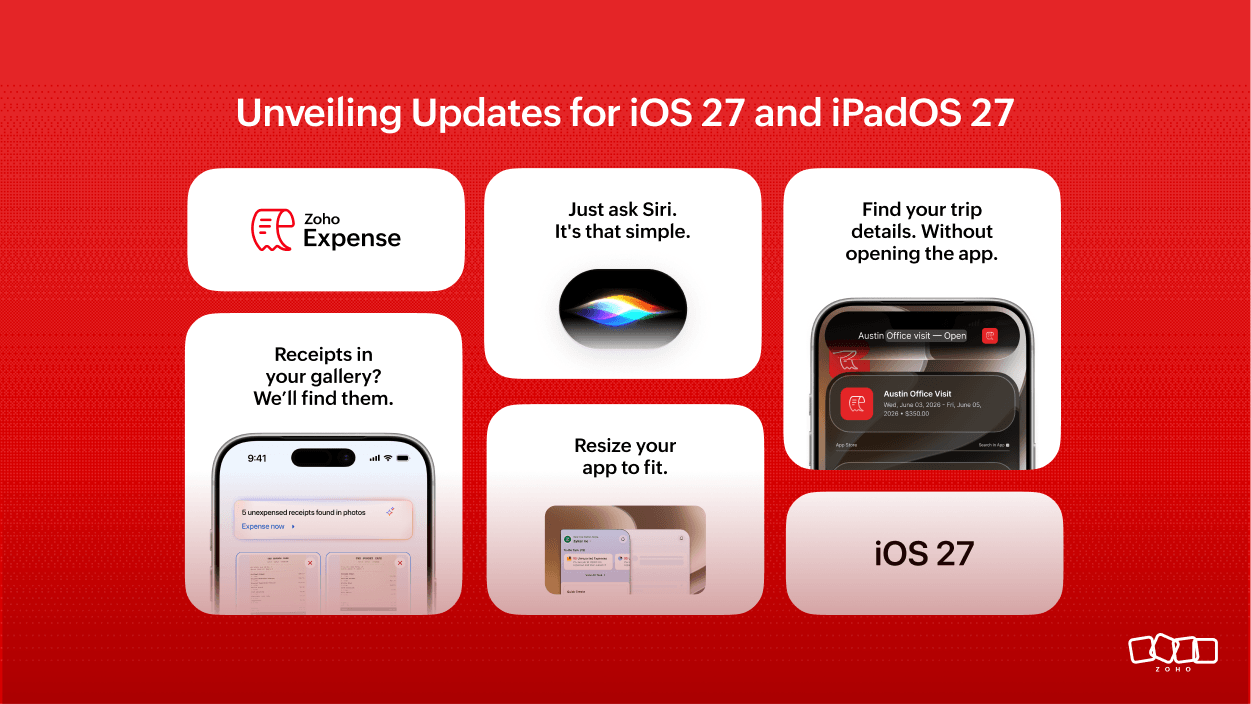
Zoho Expense makes receipt processing effortless. The Vision framework identifies receipts from your Photos app, and Apple Intelligence analyzes and suggests the most relevant ones contextually inside your expense reports, so the right receipt shows up exactly when you need it. Siri can now summarize a trip and its itinerary and dates, making it easy to share with a colleague or reference at a glance.
Zoho Invoice takes the manual work out of adding customers. Scan a business card, and Foundation Models will pull the contact details and create a new customer record without any manual entry. Siri handles pending transactions by voice so the routine parts of invoicing move without you opening a single screen.
Zoho Inventory brings Image Playground into the mix, letting you create visuals for item listings, marketing materials, or internal documentation without leaving the app. Describe what you need, generate an image, and put it to use. Siri surfaces pending transactions by voice, and the extra-large portrait widget on iPhone and iPad lets you monitor stock and transactions directly from your Home Screen.
Zoho Billing lets you view and approve pending transactions for specific contacts using natural language, without navigating through the app.
Security that thinks before you have to
OneAuth now generates a risk summary every time a sign-in attempt comes in. Instead of a bare approve or deny, you see where the attempt came from, from which device and which browser, and when—all analyzed on device before you make a decision. Recent account activity is summarized into a visual chart with critical alerts highlighted so you know what actually needs your attention without reading through everything.
The Ask OneAuth assistant lets you perform actions directly from a chat window. Ask it to enable MFA, verify with biometrics, and see a summary of what’s enabled, all without navigating between screens. And the new extra-large widget lets you see multiple codes at a glance from your home screen.
Zoho Directory and Zoho One Admin both bring a full admin dashboard to your home screen. User counts, app usage, sign-in trends, most active users—they’re all visible without opening the app. When you need to go deeper, ask for a report in plain language and get it back as a structured chart, processed entirely on the device. Siri can answer org stat questions out loud for a quick read on the go. On iPad and Mac, the app stretches into a desktop-class admin console using the available space in landscape.
A smarter, fresher experience across every screen
Several other apps also got significant design and flexibility updates this year.
Zoho Translate got a full redesign with Live Translation that works in real time. Translated speech follows with minimal delay, making it genuinely useful for meetings, travel, and customer conversations across languages. Foundation Models bring context-aware translations that understand intent rather than just converting words. Siri can now access your translation history, start bilingual conversations, or translate content through natural language on the go.
Zoho Apptics rebuilt its experience around native SwiftUI and App Intents with a Liquid Glass interface across iPhone and iPad. Ask questions in plain language and get instant auto-generated charts, rankings, and insights about your app’s usage and performance.
Zoho Recruit gets a refreshed Liquid Glass interface, on-device notification summaries, a new portrait widget for daily to-dos, and a layout that adapts dynamically to different window sizes.
Zoho Spatial Designer adapts instantly to any screen size or configuration. Drag to resize, and the layout reflows, rearranges, and rescales without anything feeling cramped. Visual Intelligence adds a specific capability that anyone who works across multiple projects will appreciate. Point your camera at a QR code, and it recognizes the project, opens it, and drops you back exactly where you left off.
Your apps, your screen size
One thing that changed quietly across almost every Zoho app this year is how they handle the space you give them. Notebook, Scanner, Sign, Recruit, Tables, Solo, Spatial Designer, OneAuth, One Admin, Directory, and the Finance apps all now adapt intelligently to whatever screen size or configuration you’re working in. Drag to resize during iPhone Mirroring and the layout reflows instantly. Snap two apps side by side on iPad, and neither one feels cramped.
Open anything on Mac, and it stretches into something that actually uses the extra space rather than just scaling up a phone layout. And as new screen formats like the iPhone Duo arrive, we’re committed to making sure our apps feel right at home on them, too. It’s the kind of update that doesn’t announce itself, but once you’ve used your apps this way, going back to a fixed layout feels unnecessarily rigid. And across every Zoho app this year, that flexibility is no longer an afterthought.
Your apps are ready. Are you?
Instead of switching apps to find what you need, it’s already there. Instead of asking your device to catch up, it’s already ahead of you. Instead of doing it manually, it just happened.
That’s a wrap. Your most productive era starts now.
Update your Zoho apps and your Apple devices to the latest versions, and you’re all set. We’d love to hear which Apple updates are your favorite and which Zoho apps adapted the tech well. Drop a comment and let us know your thoughts. We’re all ears!
See you next Apple season!

Comments
2 Replies to Zoho apps on Apple's latest: Here's everything new across iOS 27, iPadOS 27, and macOS 27 Golden Gate
Wow great to hear that, good news for the ios users tho. Great work
Thanks so much, Lalithambigai! It really is a great time to be an iOS user!