Reimagining Zoho Invoice for Apple’s New iOS 27, iPadOS 27 and macOS 27

Apple's latest releases introduce a new set of intelligent capabilities built into the system. Apple Intelligence for processing and understanding information locally, Siri for handling tasks through voice commands, adaptive layouts , and widgets that keep key information accessible without opening the app. These capabilities aren't limited to Apple's own apps. They also give new ways for Zoho Invoice to deliver a smarter, faster, and more seamless invoicing experience.
We've been working to bring the most relevant of these capabilities into Zoho Invoice, so that the tasks you do every day take fewer steps and less effort. Here’s how these capabilities enhance your everyday experience in Zoho Invoice.
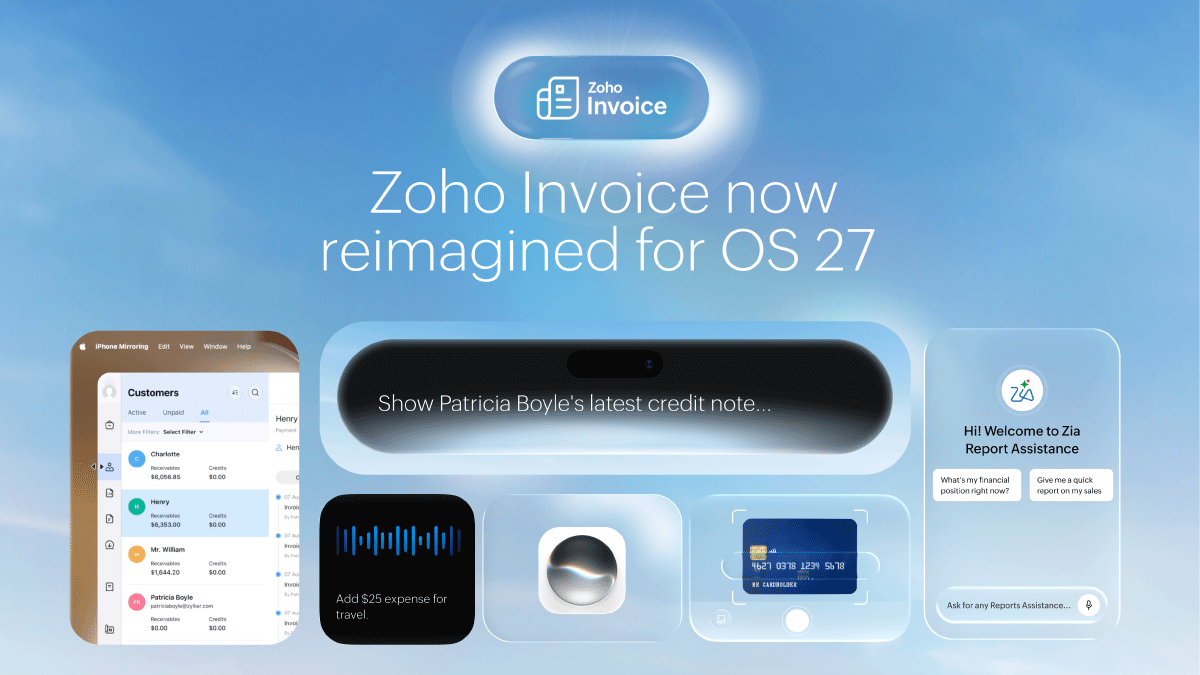
Hands-Free Invoicing with Siri
Supported versions: iOS 27, iPadOS 27 & macOS 27
Routine invoicing tasks no longer require you to open the app and navigate through menus. With Siri, you can complete common actions using simple voice commands.
Create a new invoice, record a payment, or log an expense by telling Siri what you need. Siri surfaces the relevant screen and lets you complete the action in fewer steps.
Need to find a customer? Ask Siri by name and Zoho Invoice returns the matching record immediately. Checking overdue invoices? Siri takes you directly to the filtered view. You can even record a payment against an invoice by providing the customer name or invoice number.
Smarter Scanning with Apple Intelligence
Supported versions: iOS 27, iPadOS 27 & macOS 27
Some of the most time-consuming parts of invoicing are the ones that seem small: typing out a customer's details from a business card, entering payment information manually, or opening report after report just to find one number. Apple Intelligence in Zoho Invoice handles all of these for you, right on your device.
Scan a business card and Zoho Invoice reads the contact details automatically, then creates a new customer record or matches the information to an existing contact, with no manual entries. Point your camera at a payment card and the payment fields fill themselves in, ready for you to confirm. Need a quick overview of your numbers? Ask for a summary of your invoice data and get the key figures in a few readable lines, without opening the full report.
Layouts That Fit Every Screen Size
Supported versions: iOS 27, iPadOS 27 & macOS 27
Zoho Invoice automatically adjusts its interface based on your device, screen size, and orientation. Whether you are working on an iPhone, using an iPad in landscape mode, or running the app in a split-screen setup, the interface reorganizes itself to make optimal use of the available space.
Switching between devices or resizing a window requires no manual adjustment. The layout adapts in real time, maintaining a consistent and efficient experience throughout.
Stay on Top of Invoicing Without Opening the Zoho Invoice App
Supported versions: iOS 27, iPadOS 27 & macOS 27
Tracking transaction activity no longer requires opening the Zoho Invoice app. The Extra-Large Widget provides a real-time summary of your transactions directly on your Home Screen.
Apply a filter to focus on the transactions that matter most, whether overdue or recently created invoices, and get the information you need without navigating into Zoho Invoice.
Every one of these updates is built around the same goal: less time managing your invoices, and more time running your business. Whether you're asking a question, scanning a card, speaking a command, or glancing at a widget, each interaction is designed to get you the result you need with the least amount of effort.
Moreover, this is only the beginning. More Apple Intelligence integrations are planned for upcoming releases.
Update your Zoho Invoice app today to experience these features, and share your feedback on what you would like to see next.
Available on iOS 27, iPadOS 27, and macOS 27 on Apple Intelligence-supported devices.


Comments