Break down department silos: 7 ways to keep handoffs visible

Key summary: Department silos form when the information one team needs can’t reliably reach another, even though it exists. You break them down by putting each handoff in shared places: one searchable record, one current file, decisions kept with their thread, and a named owner for the next step. Software removes the friction, but incentives and trust still need leaders
Somewhere in your company right now, someone is searching three apps for an answer a colleague already wrote down. The file exists. The decision was made. It just never made it across to the team that needed it.
That gap is a department silo, and it’s expensive. In Atlassian’s State of Teams 2026, 87% of knowledge workers said that when everyone is in execution mode, they lack the time or capacity to coordinate. Teams don’t need more meetings. They need handoffs that arrive with their instructions attached.
If you’ve read our guide to team silos and its companion on communication silos, the diagnosis will sound familiar. Boundaries themselves aren’t the problem; Finance should protect payroll and Security should control incident details. The trouble starts when a legitimate boundary blocks something a legitimate decision needs.
Zoho Workplace is an integrated suite of apps for email, chat, files, documents, meetings, and company announcements, so those jobs happen in one connected place. Fixing one silo at a time is like patching one leak in a sinking boat. In this post, we’ll show how a connected set of tools seals the gaps between departments, with use cases you can borrow, a simple way to pilot it on one handoff, and an honest look at what no tool can fix.
What causes department silos?
A department silo forms when information another department needs can’t reliably cross into its work, even if that information technically exists. It’s rarely one bad team. In Miro’s 2025 Momentum at Work Report, 63% of the 6,148 knowledge workers surveyed said information and data are spread across too many tools. The usual causes are:
- Incentives: Teams are measured on their own output, not on the work they create for others.
- Ownership: Sharing can feel like losing credit or control.
- Handoffs: Requests arrive without purpose, rationale, or the teams a change affects.
- Tools: Scattered systems create version confusion and hide history.
This is where software earns its place. It can’t change what your teams are rewarded for, and it won’t make anyone feel safe admitting a plan has slipped. What it can do is take the friction out of the boundary: Make the right file easy to find, keep one current version, keep the reasoning attached to the work, and keep private things private.
How does Zoho Workplace help break down department silos?
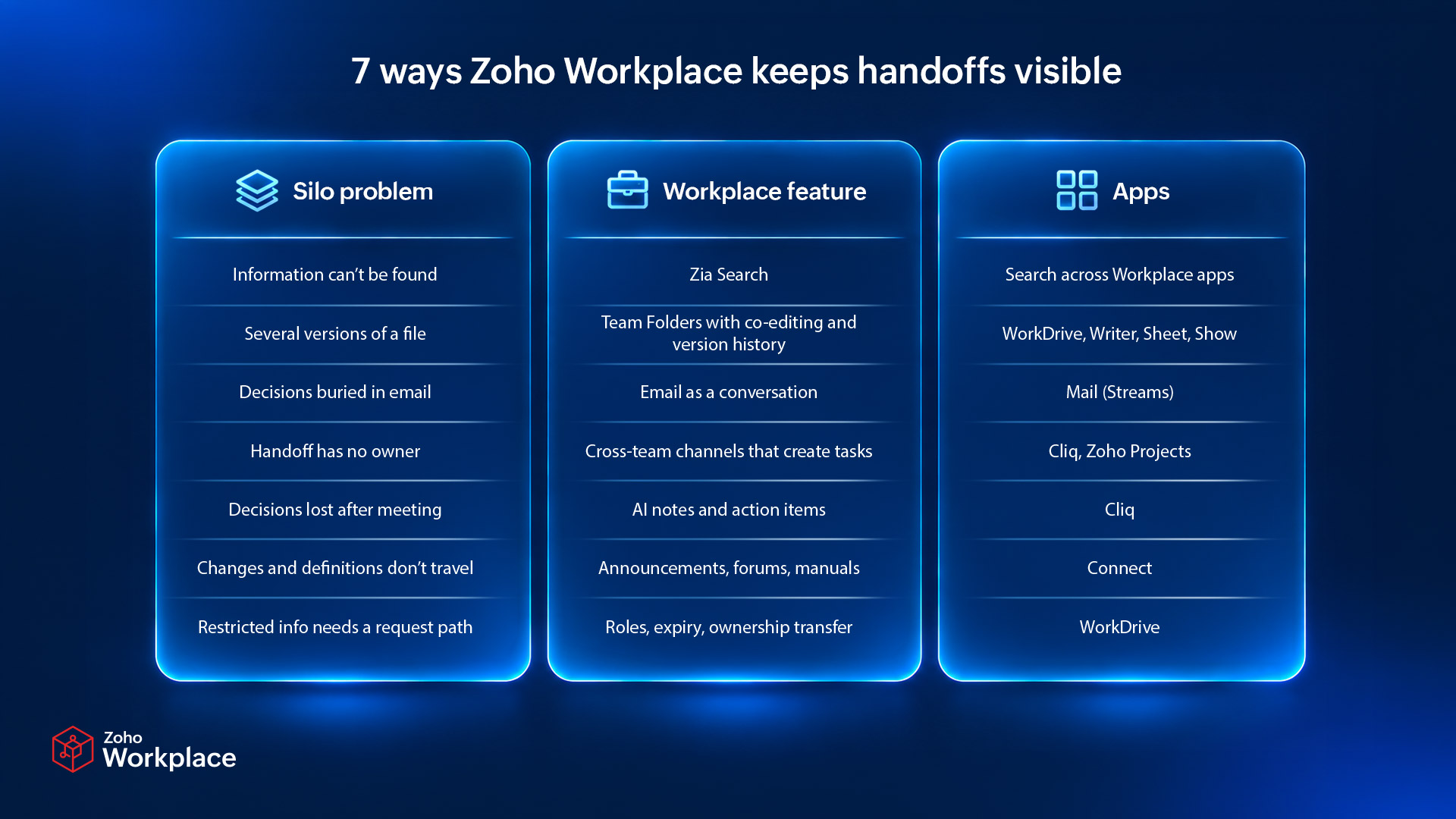
Zoho Workplace puts the handoff in shared places that every affected team can search, edit, comment on, and see. Here are seven ways it does that.
1. How do you find what another department already knows?
Zia Search looks across your Workplace apps from one place. Results are grouped by app, and filters help you narrow them, so you don’t need to know whether the answer lives in an email, a chat, or a file.
The silo it fixes: Information that exists but can’t be found.
Use case: Imagine that Support needs the launch brief Product wrote last week. Instead of pinging three people, a Support lead searches the product name once and filters the results to WorkDrive.
Zia Search turns “Who knows where that lives?” into a quick lookup, but only when files and threads live in shared spaces. That’s where the next feature comes in.
2. How do you keep one current version of a file?
Keep the controlling file in a WorkDrive Team Folder, a shared workspace where members can create, upload, edit, and share files; and edit it in Writer, Sheet, or Show. Everyone works on the same file, and the version history lets you see what changed and restore an earlier version if needed.
The silo it fixes: Several versions of the truth, with no way to tell which one is current.
Use case: Marketing, Product, and Support keep one launch plan in a shared Team Folder. When the date changes, one person updates the plan, and the comments, tasks, and approvals stay attached to it. Nobody works from a copy that was attached to an email last Tuesday.
That’s a practical single source of truth: One authoritative record that everyone can reach.
3. How do you keep decisions with the email thread?
Zoho Mail Streams turns an email into a conversation. You can tag teammates and add comments, so the reasoning stays with the thread instead of being scattered across forwards.
The silo it fixes: Decisions buried in one person’s inbox.
Use case: A customer escalation lands in the support inbox. Rather than forward it to Product and lose track of who said what, the Support lead tags the product manager in Streams. The discussion about the fix stays on the original thread, and anyone tagged later can read the history.
4. How do you turn a handoff into a task with an owner?
Create a Cliq channel for the handoff between two teams so the conversation lives in one place. Cliq can also turn a discussion into a Zoho Projects task and assign it to a person with a simple command. (Projects is a separate Zoho product, so you’ll need that as well.)
The silo it fixes: Handoffs that stall because nobody owns the next step.
Use case: Sales and Implementation share a channel for each new customer. When a representative mentions a custom commitment, someone turns that message into a task assigned to the implementation lead. The promise now has an owner instead of living as a stray chat message.
Cliq can also post WorkDrive sharing notifications to the channel, so both sides see when a file is shared. It’s a low-effort way to practice cross-team collaboration without adding meetings.
5. How do you record decisions from cross-team meetings?
Zia in Cliq can take meeting notes, keep a record of who said what, and identify tasks and the people they’re assigned to. Decisions stop living only in people’s memories.
The silo it fixes: Decisions that get reopened because nobody can find the reasoning.
Use case: A cross-team kickoff settles who owns the data migration. Zia’s notes capture the decision and the action items, and the team files the summary in the shared Team Folder. Three weeks later, when someone asks why, the answer is a search away.
Pair the notes with a one-line decision record: the decision, the date, the owner, and the teams it affects. Give the notes a quick human check before filing them.
6. How do you share changes and definitions across the company?
Zoho Connect gives you announcements, forums, and a Knowledge Base for manuals and SOPs. A changed date or a shared definition lands in one visible place and reaches every affected group.
The silo it fixes: Departments using the same word, or the same date, differently.
Use case: Sales and Marketing disagree on what a qualified lead means. Publish the agreed definition as a manual in Connect, name an owner, and link to it from the channels where the term comes up. When the definition changes, post an announcement so everyone hears it at the same time, not in installments.
A definition nobody owns goes stale, so it’s better to add a review date.
7. How do you share across departments without exposing private files?
Breaking down silos doesn’t mean opening every file. WorkDrive admins can set roles and access permissions at the account and Team Folder levels, share with people outside the organization using permissions and expiry dates, and transfer ownership of files when someone leaves or changes roles.
The silo it fixes: Legitimate boundaries with no clear process to receive what another team needs.
Use case: Finance keeps payroll files in a restricted folder. It shares the approved headcount summary with Operations in a separate folder with view-only access, and names an owner who handles requests. Operations gets the answer, not the payroll file. When a finance analyst changes roles, an admin can move ownership of their files so nothing gets stranded.
How do you roll this out on one handoff?
Start small. Pilot one handoff before you try to reorganize the whole office. Pick a recurring handoff with a visible cost, such as repeated questions or work that keeps coming back, and set it up in Workplace following these steps:
- Create a Team Folder for the handoff and assign roles.
- Put the controlling file there and edit it in Writer, Sheet, or Show.
- Create a Cliq channel for the two teams and name an owner on each side.
- Use Streams for threads that start in email, and Connect for announcements when something changes.
- Review after four weeks: Are people searching less, repeating the same question less, and reopening fewer decisions?
Our team silos guide explains the method behind this pilot.
What can’t software fix?
Software removes friction at the boundary. It can’t repair a target that rewards hoarding, make people feel safe admitting a plan is off track, or decide what must be shared. Those depend on leaders who change the incentives around sharing and give credit for it. Use Workplace to make good habits easy, not to stand in for them.
FAQ
Can software eliminate department silos?
No. A platform removes friction like scattered files and buried decisions, but incentives, credit, and trust still need people to fix them.
Does breaking down silos mean opening every file?
No. Keep restricted files restricted, and give other teams an approved summary or a clear way to request access.
Which apps should we start with?
Start with the ones the handoff already uses. For many teams, that’s WorkDrive for the shared file and Mail and Cliq for the conversation.
Does Workplace work with Zoho Projects?
Cliq can turn a discussion into a Zoho Projects task, so teams that use both can assign work from a conversation. Projects is a separate Zoho product.
How long before we see results?
Review one handoff after about four weeks, then decide whether to extend the setup to the next one.
Pick the handoff that causes the most chasing this month and set it up in Workplace. Try Zoho Workplace for free today.

Comments