From static PDFs to smarter workflows Part 2: Automate data collection with Zoho Workplace

Welcome to Part 2 of the series!
In Part 1, we explored how Zoho Writer brings static PDF files to life.
Part 2 is all about action.
In this post, we’ll show you how document forms help you collect info, capture electronic signatures, and run full end-to-end workflows directly inside Zoho Writer.
Sometimes, a document needs to do more than be read
Consider an employee onboarding document.
It contains all of the information a new employee needs. But the employee needs to provide personal details, select options, complete required fields, and sign the document.
Or, consider a vendor onboarding process.
The vendor needs to provide different information depending on the type of business. Some fields should appear only when they’re relevant. Certain information can already be available in another data source and shouldn’t have to be entered again. Once the form is submitted, it may need to go through a review and approval process before the next step begins.
A static document can communicate information. An interactive document can start a process.
This is where document forms come in.
1. Turn documents into experiences people can complete
Many organizations still rely on paper forms, downloadable documents, and other non-interactive files to collect information. That often means more manual work for everyone involved.
The person filling out the form has to enter information manually. The person receiving it may need to check whether the submission is complete. Missing information can trigger another round of emails and follow-ups. The completed form may then have to be moved into another system before work can continue.
Document forms help bring these steps together.
Key benefits
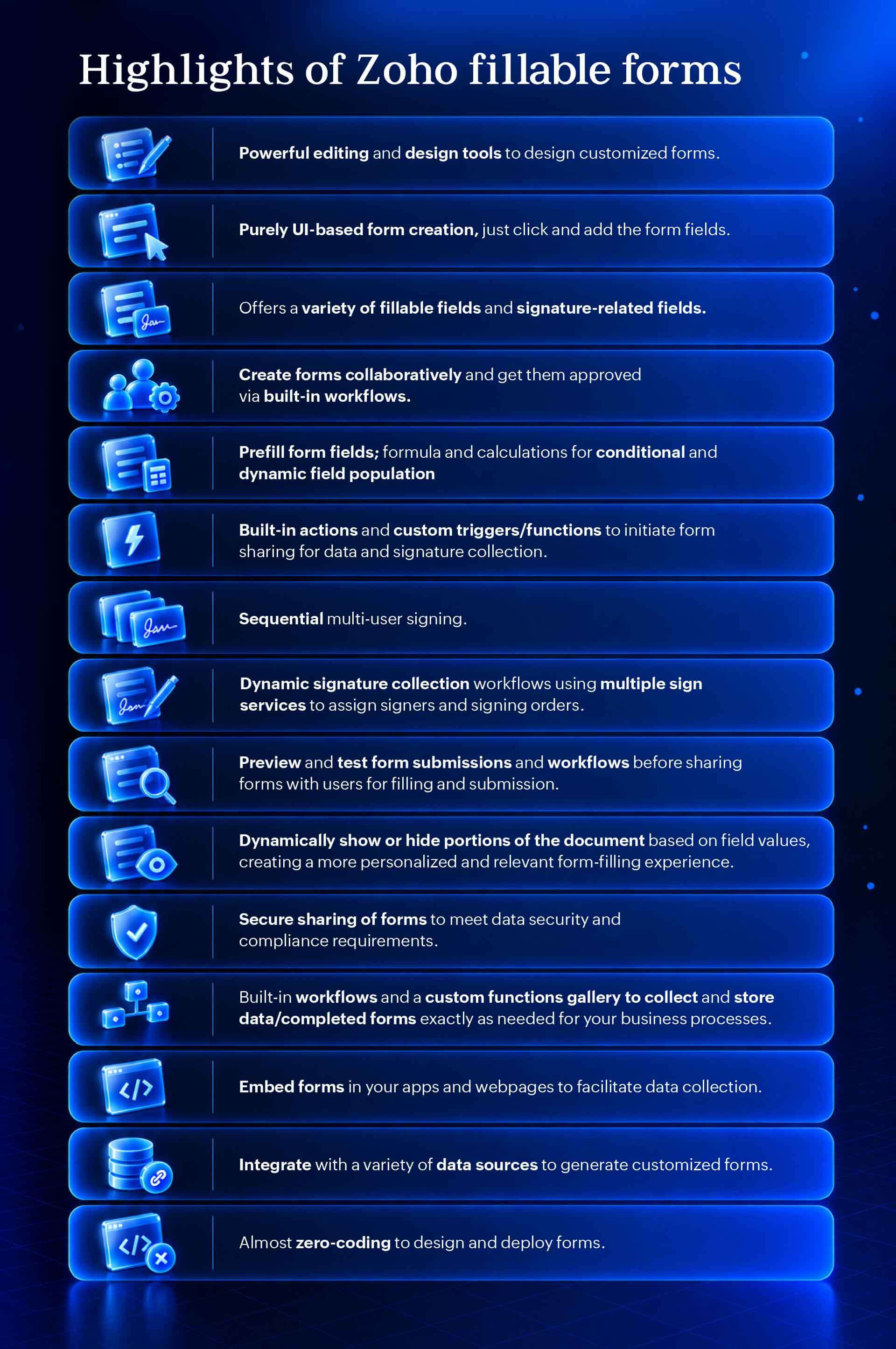
- Effortless setup: Convert existing paper files into digital forms or build custom ones from scratch, without any complex coding.
- Intuitive UI builder: Effortlessly place fillable data fields, digital signatures, and custom inputs tailored to your exact process.
- Fewer manual errors: Ensure that required fields are completed correctly the first time, eliminating back-and-forth follow-ups.
- Seamless integration: Move collected data instantly into your core systems so your team can act on it right away.
The result is a simpler path from document to data collection.
2. One form doesn’t have to show everyone the same thing
Nobody likes filling out long, irrelevant form fields. The secret to higher completion rates is asking only for what actually matters and skipping the rest.
That’s where dynamic forms can make a significant difference. They turn static questionnaires into smart, responsive experiences.
- Conditional logic: You can show or hide fields based on previous inputs. For instance, in a vendor registration form, selecting “Sole Proprietorship” automatically displays tax fields that are relevant to individuals while hiding corporate compliance sections.
- Automated calculations: Eliminate manual math. Employee expense request forms can automatically calculate totals, mileage reimbursements, or tax allowances on the fly.
- Prefilled fields and smart population: You can save users time by automatically pulling in known data, ensuring accuracy and reducing effort.
- Adaptive document views: Tailor the final document in real time. Dynamic forms can display or hide entire clauses and sections based on the user’s entries.
The benefit is straightforward: Ask for what you need. Hide what you don’t. Reduce unnecessary input and potential errors.
3. Put existing information to work
Re-entering data is one of those quiet, daily annoyances that silently eats away at your team’s time and drives your customers crazy. The data is almost always sitting right there in your system—yet we constantly ask employees, clients, or partners to fill out the exact same fields all over again.
By connecting the document forms directly to your existing data sources, you can instantly turn a static document into an intelligent, dynamic experience.
Here’s why making the switch changes everything:
- Eliminate repetitive tasks: Automatically prefill fields like names, emails, account numbers, or order histories so users never have to type the same detail twice.
- Deliver a personalized touch: Transform a standard, blank form into an interactive conversation that acknowledges who the user is from the second they open it.
- Capture only what matters: Focus exclusively on collecting new or updated information rather than wasting time re-verifying old data.
- Boost completion rates: Fewer fields mean less friction, leading to faster completions and significantly higher submission rates.
4. Collecting information is only the beginning
Forms gather data. Workflows get work done.
A submitted form shouldn’t trigger a mountain of manual tasks. Yet, for too many teams, hitting “Submit” is just the start of a tedious, multi-step chore:
- Reviewing the entries line by line.
- Emailing the form around for approvals.
- Pinging team members to give them a heads-up.
- Copy-pasting details into other systems.
- Manually storing files in the right folder.
- Chasing down missing information.
When you look at it this way, a form submission isn’t the finish line; it’s just the trigger for what happens next.
With document forms, built-in approval flows and dynamic workflows take care of the heavy lifting the moment a form is completed. You can automate every next step so your process keeps moving seamlessly behind the scenes.
- Smart approvals and notifications: Automatically route requests to managers for sign-off and instantly alert the right teams.
- Custom triggers and functions: Kick off document sharing for data gathering or e-signatures without lifting a finger.
- Tailored storage and integrations: Tap into a rich gallery of custom functions to validate data and store completed documents exactly where your business needs them.
How it looks in practice:
| Scenario | What happens automatically |
| Employee requests | Submission instantly routes to the direct manager → manager approves → the next action triggers automatically. |
| Customer onboarding | Information is submitted → data validates automatically → the target team gets notified → the record advances to the next stage. |
A form collects the information you need, but a workflow turns that information into immediate action.
5. When one signature isn’t enough
Some documents need more than one signature. And often, the order matters.
A contract may need internal approval before it goes to a vendor. A financial document may require multiple sign-offs. An HR process may involve the employee, manager, and HR team.
Document forms support signature-related fields and workflows for more structured signature collection.
You can create sequential multi-user signing processes, define signing orders, and build dynamic signature collection workflows. With support for multiple signing services, you can assign signers and determine how signatures are collected based on the needs of the process.
For example, a document could move through:
Manager → Legal → External signer
Alternatively, the signing path could change depending on the information entered in the form. This gives teams greater control over how documents move through signature processes.
6. Build together. Test before you send.
A complex form can create just as much friction as a complicated document if it isn’t tested properly.
A field may not appear when it should. A condition may not work as expected. A workflow may route a submission incorrectly. A required section may be unclear to the person filling it out.
With document forms, your team can collaborate in real time to build forms, establish approval workflows, and put everything to the test before hitting send.
- Preview live behavior: See exactly what your users will see before publishing.
- Test submissions: Verify that field validations, required sections, and dynamic conditions trigger smoothly.
- Validate workflows: Ensure that every response routes to the right owner without getting lost in transit.
This helps teams identify issues before the form reaches employees, customers, or partners.
7. Don’t make people go looking for the form
Document forms can be shared through the channels where people already work. You can share forms through Zoho Mail or Cliq, embed them in Zoho Connect, or embed them in your apps and webpages to facilitate data collection.
This gives teams flexibility in how they distribute forms based on the audience and use case.
- Need to collect information from employees? Share it through your existing workplace channels.
- Need to make a form available within your organization’s community? Embed it where employees already access information.
- Need to collect data through an application or webpage? Embed the form directly into the relevant experience.
The easier it is for people to reach the form, the easier it is for them to complete the process.
From PDF to completed process
The strongest value emerges when you stop thinking about PDF editing and document forms as separate tasks. They can be part of a larger document workflow.
HR policy acknowledgment
An HR team needs to update an existing policy.
First, the team edits the PDF to update the policy details and highlights the information employees need to pay particular attention to. If the document needs to be shared with a different audience, sensitive or internal information can be removed where necessary.
The next step is acknowledgment.
Instead of asking employees to download, print, sign, and return the document, the team can create an interactive form for the process. Employee information can be prefilled, relevant fields can be displayed dynamically, and acknowledgments or signatures can be collected through the form.
The completed submission can then enter the appropriate workflow. What began as a document update becomes a more complete, trackable process.
Vendor onboarding
A vendor onboarding document may need regular updates as requirements change.
The team can edit the PDF, update information, add or replace images, and organize the pages before preparing the document for use.
The information-gathering stage can then move into an interactive form.
Based on the vendor’s business type, the form can show the relevant fields and hide unnecessary sections. Existing information can be prefilled where appropriate. Required data and signatures can be collected, and the submission can move through the appropriate workflow.
The outcome is a more consistent process with less back-and-forth and fewer incomplete submissions.
More work doesn’t need more tools
Document work often becomes fragmented because every new requirement introduces another application.
- Need to edit a PDF? Use one tool.
- Need to collect information? Use a second one.
- Need signatures? Add another.
- Need approvals? Find a workflow tool.
- Need to share the form? Move back to email or chat.
Over time, the process becomes a patchwork of applications connected by manual effort.
Zoho Workplace takes a different approach by helping bring more of the document lifecycle into the environment where teams already communicate and collaborate.
- Edit what needs to change.
- Protect information that needs to remain confidential.
- Restructure documents around the task at hand.
- Turn static documents into interactive forms.
- Collect the right information.
- Use conditions and dynamic fields to make forms more relevant.
- Route submissions through workflows.
- Collect signatures in the right sequence.
- Share forms through the channels and spaces where people already work.
Wrapping up: Keep documents moving
The value of a document isn’t limited to the information inside it. What matters is what people can do next.
- Can they update it when something changes?
- Can they share an appropriate version securely?
- Can they extract only the pages they need?
- Can they collaborate on it?
- Can they collect information from it?
- Can the information trigger the next action?
- Can the right people review and sign it?
With Zoho PDF Editor and document forms in Zoho Workplace, documents can remain active participants in your workflows instead of becoming static files that create another chain of manual work.
Because, a document shouldn’t be where work stops. It should be where the next step begins.


Comments